Claude Code skills for developers: what Claude has and what to add
What skills Claude has, what skills to give it, and the best Claude Code skills for developers: planning, front-end, video and research, with setup steps.
"What skills does Claude have?" has three different answers, and mixing them up is why most lists are confusing. Claude comes with some built-in skills, you can write your own, and you can connect hosted skills that call server tools. This guide separates the three, then shows which skills are worth adding if you write code for a living.
#What skills does Claude have?
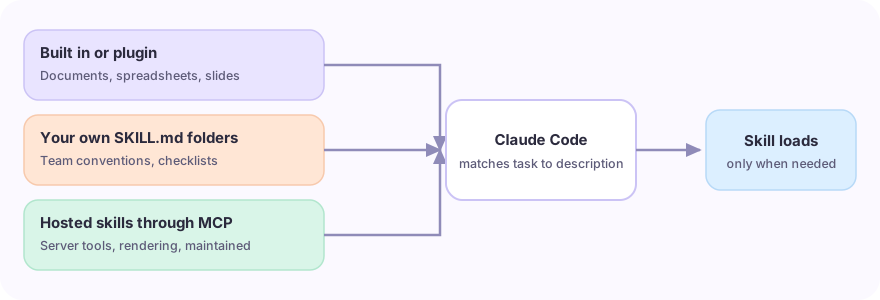
A skill is a folder with a SKILL.md file: instructions that tell Claude how to do one kind of job, plus optional scripts and reference files. Claude loads a skill when a task matches its description, so you do not paste the same instructions into every chat.
| Where the skill comes from | Who maintains it | Good for |
|---|---|---|
| Built in to your Claude app or plugins you enable | Anthropic or the plugin author | Common jobs such as working with documents, spreadsheets and slides |
Your own SKILL.md folders |
You | Team conventions, release checklists, house style |
| Hosted skills connected through MCP | The skill's creator, served by SkillGild | Capabilities that need server tools, rendering or a maintained workflow |
Which built-in skills you see depends on your Claude product and plan, so check your own client rather than trusting a fixed list. Type / in Claude Code to see what is installed.
For the underlying idea, read Claude skills: what they are and how to use them. For how skills differ from MCP servers, read agent skills vs MCP servers.
#What skills should I give Claude?
Add a skill when you notice yourself repeating the same instructions. A practical order for a developer:
- A planning skill. Make Claude write a proposal and task list before it edits code. OpenSpec Propose turns a feature request into a proposal, delta specs, a design and tasks grounded in your existing specs. The OpenSpec guide explains the full workflow.
- A front-end quality skill. Generic output is the usual complaint. Taste Skill reads the brief, chooses a design direction and checks the result against a pre-flight list.
- A shipping skill. Brag reads your project code and produces a short launch video, so you can share what you built without screen recording.
- A documentation and research skill. Academic Plotting picks the right chart and writes the matplotlib or seaborn code for publication-style figures.
- Your own team skill. One file holding your commit style, test command and review checklist usually pays back fastest.
Keep the set small. Every installed skill adds a description Claude has to consider, and overlapping skills make it pick the wrong one.
#Top skills for Claude Code developers
These are the skills from the SkillGild catalog that suit a coding workflow, checked on October 4, 2026. This is a selection by job, not a benchmark. For the full ten-skill comparison, see best Claude Code skills.
| Job | Skill | What it does |
|---|---|---|
| Plan before coding | OpenSpec Propose | Proposal, specs, design and tasks before any edit |
| Front-end and landing pages | Taste Skill | Anti-slop design direction with a final check (guide) |
| Brand marks | Logo Design | Concepts to production SVG, tested at 16 px and in one colour |
| Launch and demo video | Brag | Turns the repo into a shareable video |
| Programmatic video | HyperFrames | HTML-to-video with timed clips and captions |
| Figures and plots | Academic Plotting | Chart choice and plotting code |
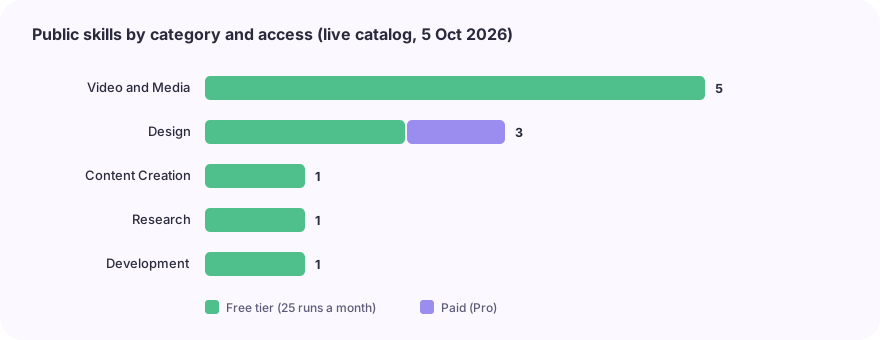
Rendering and file work run on your machine, so a video skill needs its renderer installed locally. The video skills guide lists the requirements.
#How to add a skill to Claude Code
There are two routes, and you can use both.
- Local skill. Put a folder with a
SKILL.mdin~/.claude/skills/for every project or.claude/skills/for one repository. Folder paths and the global-versus-project choice are in how to install Claude Code skills. - Hosted skill. Create a SkillGild account, run
skillgild login, and register the MCP server with your agent. The quickstart for AI agents has the exact command. Then ask Claude to use a skill by name.
Both routes also work from Codex, Cursor and Gemini CLI. See the Codex guide, the Cursor MCP guide and the Gemini CLI guide.
#Before you install a third-party skill
A skill can include scripts, so treat it like any dependency. Read the SKILL.md and every script it runs, check what it can write or send, and prefer skills with a named maintainer. The tradeoffs between free repositories and hosted skills are in SkillGild vs free GitHub skills.
#Frequently asked questions
#What are the top 10 skills for Claude?
There is no single official ranking. For developers, start with a planning skill, a front-end quality skill and one skill for your own team conventions, then add media or research skills as needed. The best Claude Code skills guide groups ten free hosted examples by job.
#Do Claude Code skills cost anything?
Local SKILL.md folders are free to write and use. At the October 4, 2026 catalog check, each hosted skill listed here included 25 free runs a month; check the listing and the pricing page for current terms.
#Can I use the same skill in Codex or Cursor?
Hosted skills can be called from any MCP client. A local SKILL.md folder works in clients that read the same format, and folder locations differ by client.
Frequently asked questions
What are the top 10 skills for Claude?
There is no single official ranking. For developers, start with a planning skill, a front-end quality skill and one skill for your own team conventions, then add media or research skills as needed.
Do Claude Code skills cost anything?
Local SKILL.md folders are free to write and use. At the October 4, 2026 catalog check, each hosted skill listed here included 25 free runs a month; check the listing and the pricing page for current terms.
Can I use the same skill in Codex or Cursor?
Hosted skills can be called from any MCP client. A local SKILL.md folder works in clients that read the same format, and folder locations differ by client.