Agent skills vs MCP servers
What an agent skill is, what an MCP server is, how they differ, and how SkillGild uses both to give Claude Code, Codex and Cursor new capabilities.

Agent skills and MCP servers solve different problems, and they work together. A skill teaches an AI agent how to do a job well. An MCP server gives an AI agent a way to reach a tool or a system. This page explains the difference, when you need each, and how SkillGild uses both.
#The short answer
| Agent skill | MCP server | |
|---|---|---|
| What it is | Instructions and supporting resources for a specific task, commonly packaged in a SKILL.md folder | A protocol endpoint that exposes tools, resources or prompts to an AI client |
| What it answers | "How should this task be done?" | "How does the agent reach this tool or data?" |
| Typical example | Review a pull request against a checklist, plan a logo, write a project proposal | Query a database, read a calendar, call an API |
| Where the know-how lives | In the skill | In your code behind the server |
| Who maintains it | The skill's creator | Whoever runs the server |
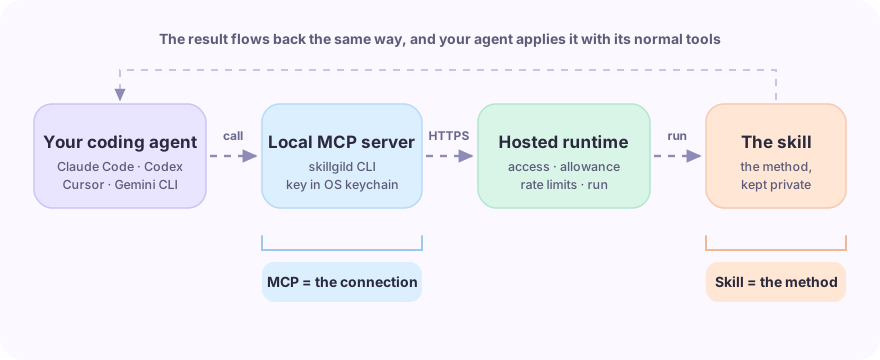
A rule of thumb: if you are describing a method, it is a skill. If you are describing a connection, it is an MCP server.
#What is an agent skill?
An agent skill packages instructions and supporting resources for a specific task. The Agent Skills standard defines a folder containing a SKILL.md file, with optional scripts, references and assets. A skill gives an agent a documented method it can reuse; it does not guarantee the output will always be correct.
Skills are useful when the same kind of job comes up again and again and you want it done the same good way each time.
#What is an MCP server?
The Model Context Protocol (MCP) is an open standard for connecting AI clients to external capabilities. Servers can expose tools, resources and prompts. Tools let an agent query a service or perform an action, while resources supply context and prompts supply reusable interaction templates.
MCP standardizes how a client discovers and accesses those capabilities. A skill can supply the workflow that uses them. Tool descriptions and server prompts can also guide the agent, so the two are complementary rather than a strict split between instructions and actions.
#How they work together on SkillGild
SkillGild is a marketplace of skills and a hosted runtime that runs them. MCP is how your agent reaches that runtime.
- You sign in once with the
skillgildCLI, which stores a revocable credential in your operating system's credential store. - The CLI runs as a local MCP server and registers with Claude Code, Codex, Cursor, Gemini CLI or any other MCP client.
- Your agent discovers a skill and reads its public schema. Installing it adds a small SKILL.md wrapper, rather than the protected implementation.
- For a prompt-based skill, your agent calls
skillgild_run_skill; SkillGild checks access and allowance, runs the prompt remotely and returns a result. - For a hybrid skill, your agent starts a session, receives a guide and calls hosted server tools. Your agent does the reasoning and local file work; the server tool code runs on SkillGild.
The same task shows where each part happens. In a figure task, your agent reads your data, writes and runs the plotting code and inspects the result, while the hosted side checks access, starts the session and answers server-tool calls.
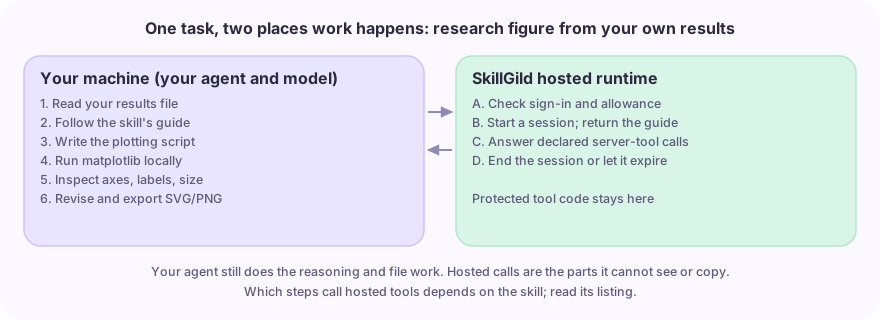
So MCP is the transport, and the skill is the capability. You do not choose between them: one MCP connection gives your agent access to every skill you are entitled to run.
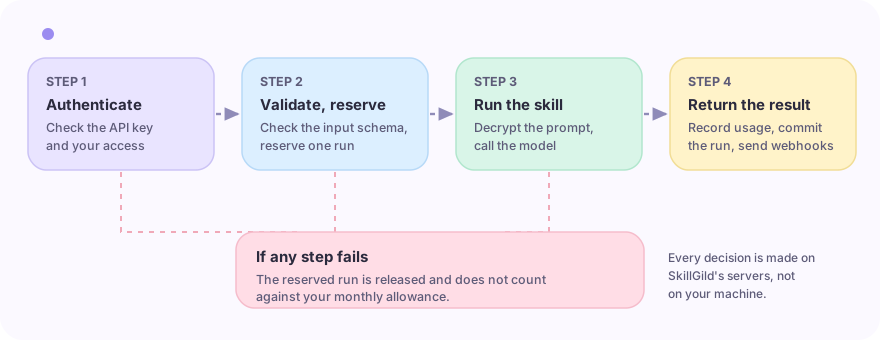
For the exact commands for each agent, see Quickstart for AI agents, and for the run flow in detail, see the documentation overview.
#Hosted skills vs files you maintain yourself
Many skills are plain instruction files that live in a project or a home directory. Those are fine for a single team. A hosted skill changes three things:
- Implementation stays hosted. Prompt-based skills keep their protected prompt encrypted at rest and load it only for an authorized run. Hybrid skills keep server tool code on SkillGild, while sending the guide to your entitled agent. The configured model still receives prompt instructions, so hosting reduces direct copying but cannot stop someone approximating behaviour from outputs.
- One account governs access. Sign-in, allowances and revocation are the same across every agent and client.
- Failed prompt runs release the reservation. Provider and platform failures do not consume the reserved free-run allowance. A hybrid session counts as a run when it starts; it then permits a limited number of server tool calls until expiry.
#When to use which
Use a skill when you want a repeatable, high-quality way of doing a task, such as a design review, a research brief or a video storyboard.
Use an MCP server when your agent needs access to something it cannot reach on its own, such as your database, an internal API or a SaaS product.
Use both when a skill's method needs live data. The skill defines the approach; your MCP tools supply the facts.
#Frequently asked questions
#Are agent skills the same as MCP tools?
No. An MCP tool is a callable action exposed by a server. A skill is a packaged method for doing a type of job. A skill can be delivered through MCP, which is how SkillGild serves them to your agent.
#Do I need MCP to use SkillGild skills?
For coding agents, yes: the local CLI registers as an MCP server. You can also call skills directly through the REST API or the TypeScript, Python and Go client libraries from your own application.
#Which agents support SkillGild?
Claude Code, Codex, Cursor and Gemini CLI have documented setup steps. Any other MCP client can connect to the same local server.
#Next steps
- Browse the catalog to find a skill for your agent.
- Follow the Quickstart for AI agents to connect it.
- Read Core concepts for versions, allowances and access.