Impeccable vs Taste Skill: which Claude design skill to use, tested
Impeccable vs Taste Skill on one real brief: the pages each built, cost, speed, invented facts and rules, and which to pick for landing pages, apps and audits.
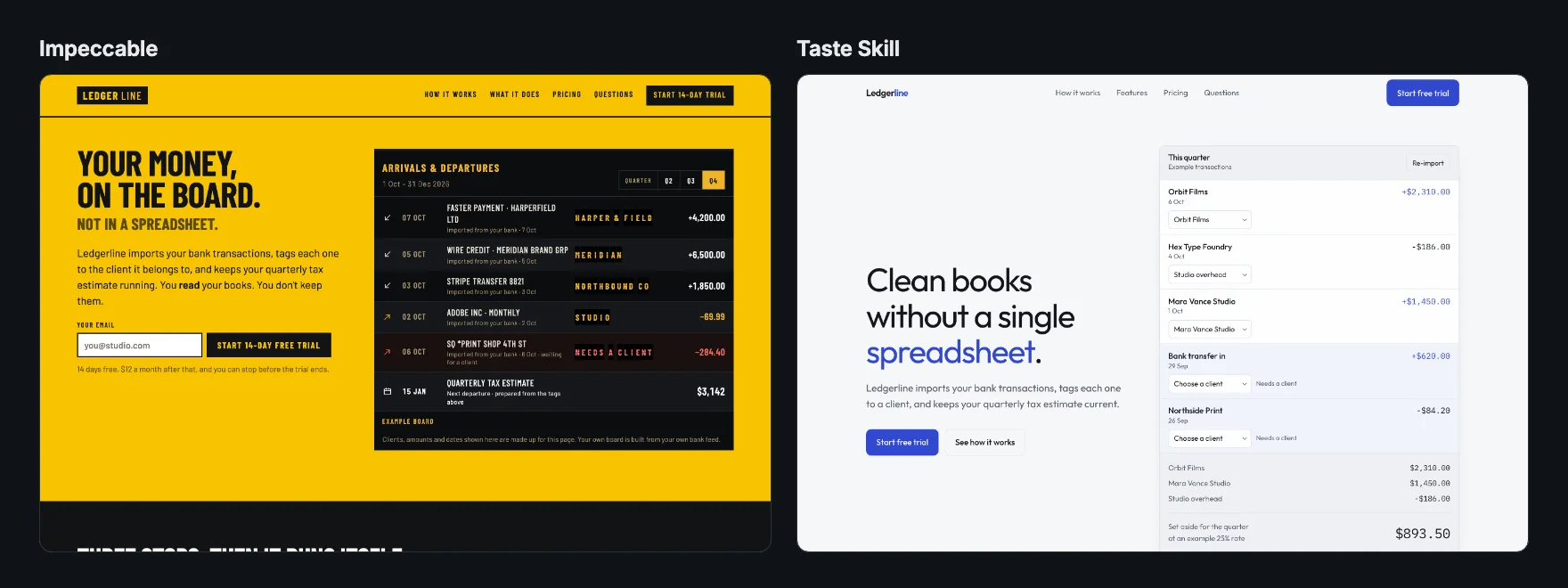
Short answer: pick Taste Skill for a clean landing page at a modest cost, and Impeccable when the page has to be memorable, has to stay truthful about your product, or is an app or dashboard rather than a marketing page. In our test on the same brief, Taste Skill produced a calm, tidy page for $2.28 in 7 minutes; Impeccable produced a far bolder page, and the only one that invented no product facts, for $7.49 in 24 minutes.
Both are among the most popular design skills for Claude Code, Codex and Cursor, and people often ask which to install. They solve the same problem, generated pages that all look alike, in very different ways. This page compares them on what they are, what they produced from one brief, what they cost and which jobs each one suits.
Try it on a real task: Impeccable is free for 25 runs a month.
#Impeccable vs Taste Skill at a glance
| Impeccable | Taste Skill | |
|---|---|---|
| Author | Paul Bakaus | Leonxlnx |
| GitHub stars (13 October 2026) | 80.7k | 95.5k |
| License | Apache-2.0 | MIT |
| What it is | A design language: 24 commands, about 40 playbooks, an anti-pattern detector and a small engine binary | One long SKILL.md of rules (about 1,200 lines) |
| How it steers the design | Picks a mode, writes PRODUCT.md, rolls a seeded concept, builds, audits, writes DESIGN.md | States a "design read", sets three dials, follows banned-pattern rules, runs a pre-flight check |
| Built for | Any interface: landing pages, apps, dashboards, docs, showcases | Landing pages, portfolios and redesigns (not dashboards) |
| Commands | /impeccable shape, audit, critique, polish, bolder, quieter, animate and 17 more |
None; it applies to the whole task |
| Install | npx impeccable install |
npx skills add https://github.com/Leonxlnx/taste-skill --skill "design-taste-frontend" |
| On SkillGild | Impeccable | Taste Skill |
#The test: one brief, both skills
We gave Claude Code the same brief for each run: the landing page for Ledgerline, a fictional bookkeeping app for freelance designers, with a hero, three steps, features, one $12 plan, an FAQ and a footer. It had to be one self-contained HTML file with Google Fonts as the only external resource, and it could not invent testimonials, customer counts, logos or awards. Both runs used Claude Code 2.1.278 with Claude Opus 5 on 9 October 2026, with the skill's files in the project and the Skill tool switched off so no other installed skill could interfere. Each skill ran once, so this is an honest example rather than a benchmark; a second run would produce different pages.
#What each skill did before writing code
Impeccable ran its context command, found no product file, and wrote a PRODUCT.md that separates what the brief said from what it did not. It listed the unknowns explicitly ("which banks… data export… card-required-or-not… must not be invented"), then rolled a seeded concept from a shortlist grounded in the subject. It landed on a Swiss departure board: money arriving and leaving as a timetable, with the quarterly tax date as the next departure.
Taste Skill declared its design read in one line ("SaaS landing for solo freelance designers… with a calm, type-led, honest-tool language"), set its dials to variance 7, motion 5 and density 4, lowering variance "because this is a money app and trust matters", and resolved two conflicts with the brief in writing: no icon library, and a working mini-product in the hero instead of a fake screenshot.
#Results
| Impeccable | Taste Skill | |
|---|---|---|
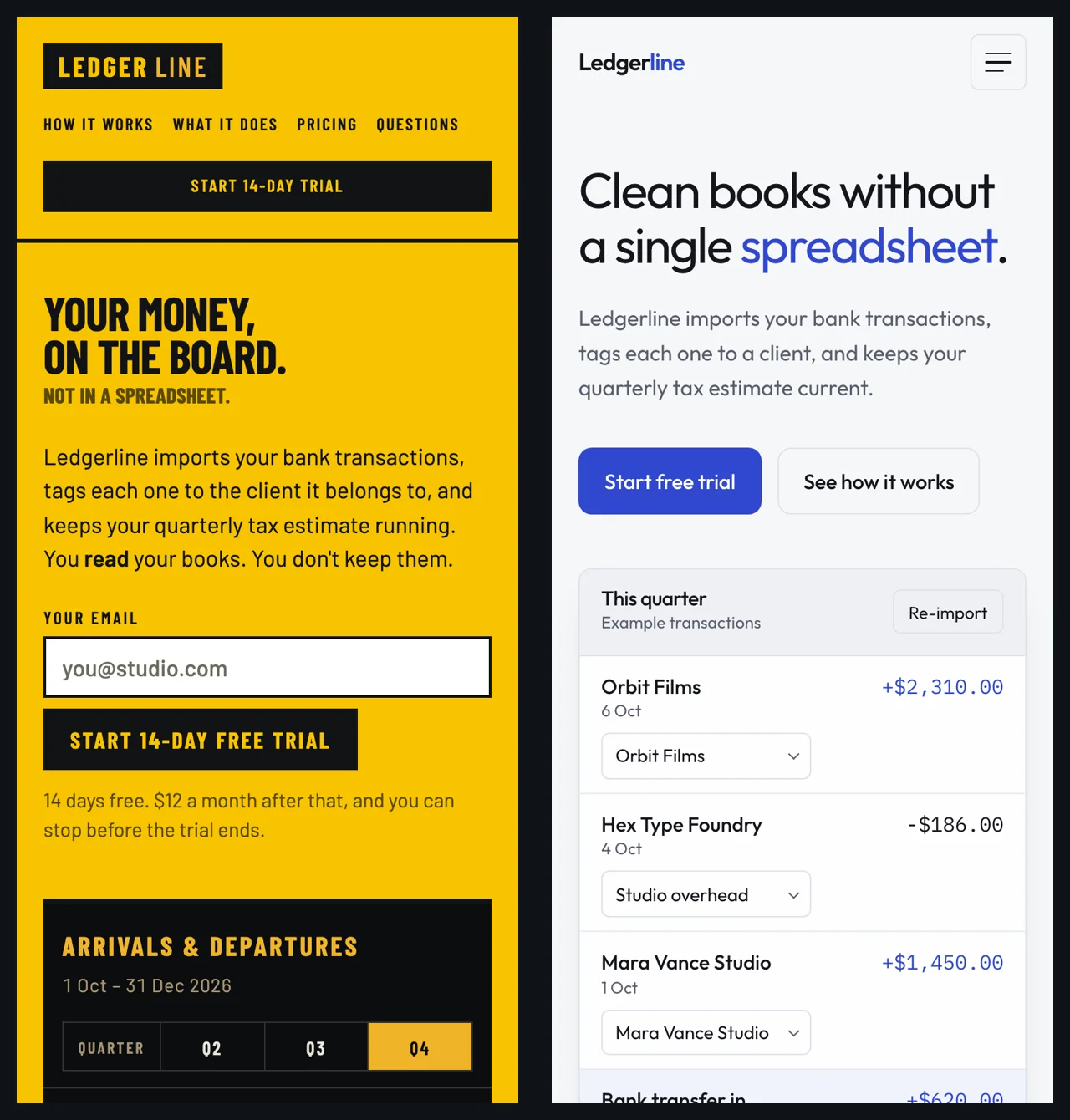
| Direction | Swiss departure board, signal yellow and graphite | Calm, near-monochrome, one ink-blue accent |
| Typefaces | Barlow Condensed and Barlow | Outfit and IBM Plex Mono |
| Visible words | About 890 | About 460 |
| Spaced em dashes | 0 | 0 |
| All-caps labels | Throughout, as the board style | 0 |
| Headline treatment | A smaller second line, "Not in a spreadsheet." | One word, "spreadsheet", in blue |
| Horizontal scroll at 375 px | None | None |
| Sample data labelled as examples | Yes ("Example board") | Yes ("Example transactions") |
| Invented product facts | None | Read-only bank link, receipt capture, CSV and PDF exports, email support, 30 days to export after cancelling |
| Impeccable detector findings† | 8 | 3 |
| Missed its own checks | No | Headline ran to 3 lines and the hero floats low at 1440 px, against its own pre-flight |
| Turns | 46 | 13 |
| Time | 23.8 minutes | 7.1 minutes |
| API-equivalent cost (reported by Claude Code) | $7.49 | $2.28 |
†Impeccable's own anti-pattern detector, run on both finished pages, leaving out its cramped-padding rule (false positives on pages that compute padding with calc()) and its design-system rules (which only apply to a page with its own DESIGN.md). With every rule counted: 55 and 6. Most of Impeccable's remaining findings are all-caps body text, which is its departure-board style rather than an oversight.
For reference, the same brief with no skill cost $0.98, took 3.3 minutes, invented similar product facts and was the only page that scrolled sideways on a phone.
#Where Impeccable wins
- It doesn't make things up. Its rule "Ask before replacing factual copy or adding claims", and the PRODUCT.md it writes when it cannot ask, kept every unsupported claim off the page. For a real product, this matters more than any visual difference: an invented "no card needed" or a list of supported banks can mislead buyers.
- A memorable direction. The departure-board concept turns the product's idea into the page. Taste Skill's page is good; Impeccable's is the one you remember.
- It covers more jobs. Four modes (persuade, operate, read, experience) and 24 commands mean it works on dashboards, settings screens and docs, and on existing interfaces:
/impeccable auditand/impeccable critiquereview what you have without rebuilding it. - It leaves a design system behind. The DESIGN.md it writes keeps later changes consistent.
#Where Taste Skill wins
- Cost and speed. About a third of the cost and a third of the time for a finished landing page.
- Stricter about generic tells. It bans the em dash outright, rations the middle dot and lists dozens of AI-design patterns to avoid. Its page had none of the template chrome the no-skill page used.
- Restraint. A calm, readable page that suits a finance product and would pass most brand reviews. Impeccable's condensed capitals and split-flap tags are bolder but slower to read.
- Simplicity. One file you can read in an evening and adjust. No binary, no commands to learn.
Its two weak points in our run: it invented product facts like the other skills, and it missed two items from its own pre-flight check. Both are reasons to review its output, not reasons to avoid it.
#Which should you use?
| Your job | Pick |
|---|---|
| A landing page or portfolio on a budget | Taste Skill |
| A launch page that has to stand out | Impeccable |
| A real product where every claim must be true | Impeccable, or Taste Skill with the facts spelled out in your brief |
| A dashboard, settings screen or app UI | Impeccable (Taste Skill says this is out of scope) |
| Reviewing or polishing an existing interface | Impeccable's audit, critique or polish |
| You want rules you can read and tweak | Taste Skill |
Can you use both? Not on the same page at once: their rules overlap and sometimes disagree, so one direction skill per page works best. A combination that makes sense, though we did not test it here, is building with Taste Skill and then running Impeccable's audit command on the result.
Whichever you choose, put the real product facts in your brief. It was the single biggest difference between a page you could ship and one you would have to rewrite.
#Install both
# Impeccable: detects your agents, then run /impeccable init inside the agent
npx impeccable install

# Taste Skill
npx skills add https://github.com/Leonxlnx/taste-skill --skill "design-taste-frontend"

# Or either one from SkillGild, for Claude Code, Codex, Cursor or Gemini CLI
skillgild install impeccable --agent claude-code
skillgild install design-taste-frontend --agent claude-code
Read the full tests: Impeccable and Taste Skill. For eight more frontend skills, including Anthropic's frontend-design skill (the best all-round default in our test), see the top 10 Claude frontend and design skills.
Frequently asked questions
Is Impeccable or Taste Skill better?
It depends on the job. In our test on the same brief, Taste Skill built a clean landing page for $2.28 in 7 minutes; Impeccable built a far bolder page, and the only one with no invented product facts, for $7.49 in 24 minutes. Use Taste Skill for landing pages on a budget and Impeccable for standout pages, app UI and audits.
What is the difference between Impeccable and Taste Skill?
Taste Skill is one long SKILL.md of rules: a design read, three dials for variance, motion and density, banned AI-design patterns and a pre-flight check. Impeccable is a design language with 24 commands, four modes, an anti-pattern detector and PRODUCT.md and DESIGN.md files that keep later work consistent.
Can I use Impeccable and Taste Skill together?
Use one direction skill per page, because their rules overlap and sometimes disagree. A sensible pairing, which we have not tested, is building with Taste Skill and then running Impeccable's audit command on the result.
Does Taste Skill work for dashboards?
No. Taste Skill says it is for landing pages, portfolios and redesigns, not dashboards, data tables or multi-step product UI. Impeccable has an Operate mode for app interfaces and dashboards.