Best MCP servers for Claude Code
The MCP servers worth adding to Claude Code for GitHub, browsers, documentation, databases, design and project tools, with the claude mcp add command for each and the skills that put them to work.
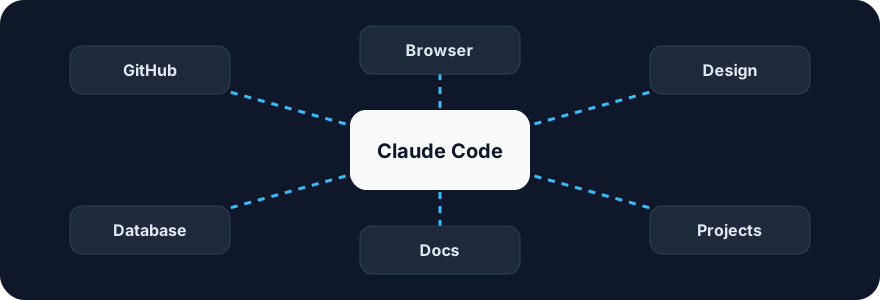
An MCP server gives Claude Code a tool it does not have on its own: a browser, your issue tracker, a database, a design file. This page lists the servers worth adding, grouped by job, with the claude mcp add command for each and the skills that make good use of them. Commands follow each project's README as of October 2026; check the README before pasting, because remote endpoints change.
Try it on a real task: Academic Plotting is free for 25 runs a month.
#How adding a server works
# A local server started with npx
claude mcp add --scope user playwright -- npx @playwright/mcp@latest

# A remote server over HTTP (sign in once in the browser)
claude mcp add --scope user --transport http github https://api.githubcopilot.com/mcp/

# See what is connected
claude mcp list
--scope user makes the server available in every project; omit it to add the server to the current project only, or commit a .mcp.json so a whole team shares it. Each tool a server exposes costs context, so add what you use and remove what you do not.
#Source control and review
GitHub MCP (GitHub's official server). Issues, pull requests, reviews, Actions runs and code search from inside a session. The remote endpoint needs no local install.
claude mcp add --scope user --transport http github https://api.githubcopilot.com/mcp/Pair it with the Code Review and Commit Commands plugins from Anthropic, which describe how to review and ship; the server supplies the pull-request tools.
#Browsers and testing
Playwright MCP (Microsoft). Drives a real browser through the accessibility tree: navigate, click, fill forms, take screenshots, read console errors.
claude mcp add --scope user playwright -- npx @playwright/mcp@latestChrome DevTools MCP (Google). Performance traces, network inspection and console access in a live Chrome.
claude mcp add --scope user chrome-devtools -- npx chrome-devtools-mcp@latestSkills that use them: Playwright Skill writes and runs scripts for general automation, and Anthropic's Webapp Testing describes a verification method for local apps. Either server supplies the browser.
#Documentation and research
Context7 (Upstash). Current, version-specific library documentation injected on demand, which cuts the number of invented APIs in generated code.
claude mcp add --scope user context7 -- npx -y @upstash/context7-mcpFor research beyond documentation, the Deep Research and last30days skills connect to search providers through their own keys rather than MCP.
#Databases and backends
Supabase MCP (official). Tables, migrations, SQL, logs and edge functions for a project.
claude mcp add --scope user --transport http supabase https://mcp.supabase.com/mcpPair it with the Supabase Agent Skills, which carry Supabase's own guidance on schema design, row-level security and auth; the server does the work, the skills keep it correct.
Postgres. Several community servers expose read-only or read-write access to a Postgres database; pick one that supports a read-only mode for anything you do not want Claude to change.
#Design
Figma MCP (Figma's Dev Mode server, local). Reads frames, variables and components so Claude can turn a design into code with the right tokens.
claude mcp add --scope user --transport http figma http://127.0.0.1:3845/mcpFigma's official Claude Code plugin bundles this server with design-to-code skills. For the design method itself, Impeccable, Frontend Design and UI UX Pro Max are skills, not servers: they tell Claude what good looks like.
#Project and knowledge tools
Notion MCP (official, remote). Pages, databases and search in a workspace.
claude mcp add --scope user --transport http notion https://mcp.notion.com/mcpNotion's workspace plugin ships the server with skills for meeting notes, research and project tracking.
Linear MCP (official, remote). Issues, projects and cycles.
claude mcp add --scope user --transport http linear https://mcp.linear.app/mcpSentry MCP (official, remote). Errors, traces and releases, so a bug report can be read from the source.
claude mcp add --scope user --transport http sentry https://mcp.sentry.dev/mcp#Skills marketplaces
SkillGild MCP. Search the catalog, run hosted skills and open sessions from any MCP client. Hosted skills keep private prompts and server-side validators on SkillGild; community skills on the same catalog are plain folders that the CLI installs from GitHub.
curl -fsSL https://raw.githubusercontent.com/SkillGild/skillgild/main/scripts/install-cli.sh | sh
skillgild login
claude mcp add --scope user skillgild -- $(command -v skillgild) mcp
The Claude Code skills page lists everything the server can reach.
#Servers versus skills
A server answers "how does Claude reach this?"; a skill answers "how should Claude do this well?". The pairs above are the pattern: Playwright plus a testing skill, GitHub plus a review skill, Supabase plus Supabase's own guidance. Adding a server without a method gets you tools and no judgement; adding a skill without the server gets you a method with nothing to act on. Agent skills vs MCP servers covers the distinction, and Claude skills vs agents, commands and plugins places both among the other extension types.
#Keeping it fast
- Keep under ten servers connected in a project. Tool definitions are loaded into every conversation.
- Prefer remote official servers where they exist; nothing to update locally.
- Use read-only modes for data you must not change.
- Put team servers in a committed
.mcp.jsonand personal ones under--scope user. - Remove a server when a project ends:
claude mcp remove <name>.
Frequently asked questions
How do I add an MCP server to Claude Code?
Run claude mcp add <name> -- <command> for a local server, or claude mcp add --transport http <name> <url> for a remote one. Add --scope user to make it available in every project, or commit a .mcp.json for a team.
Which MCP servers should I add first?
GitHub for pull requests and issues, Playwright for a real browser, and Context7 for current library documentation cover most coding work. Add Supabase, Figma, Notion, Linear or Sentry only if you use those products.
Is an MCP server the same as a skill?
No. A server gives Claude tools to reach a system; a skill tells Claude how to do a job well. They pair: Playwright plus a testing skill, GitHub plus a review skill.
How many MCP servers can I connect?
There is no hard limit, but every tool definition is loaded into each conversation. Keep under about ten connected in a project and remove servers you no longer use with claude mcp remove.