Best reverse-engineering MCP servers: Reconstruction Labs, Ghidra and IDA
Compare Reconstruction Labs, GhidraMCP, IDA Pro MCP and Reverse Engineer Anything by target, setup requirements and tested evidence. Includes Ghidra setup.
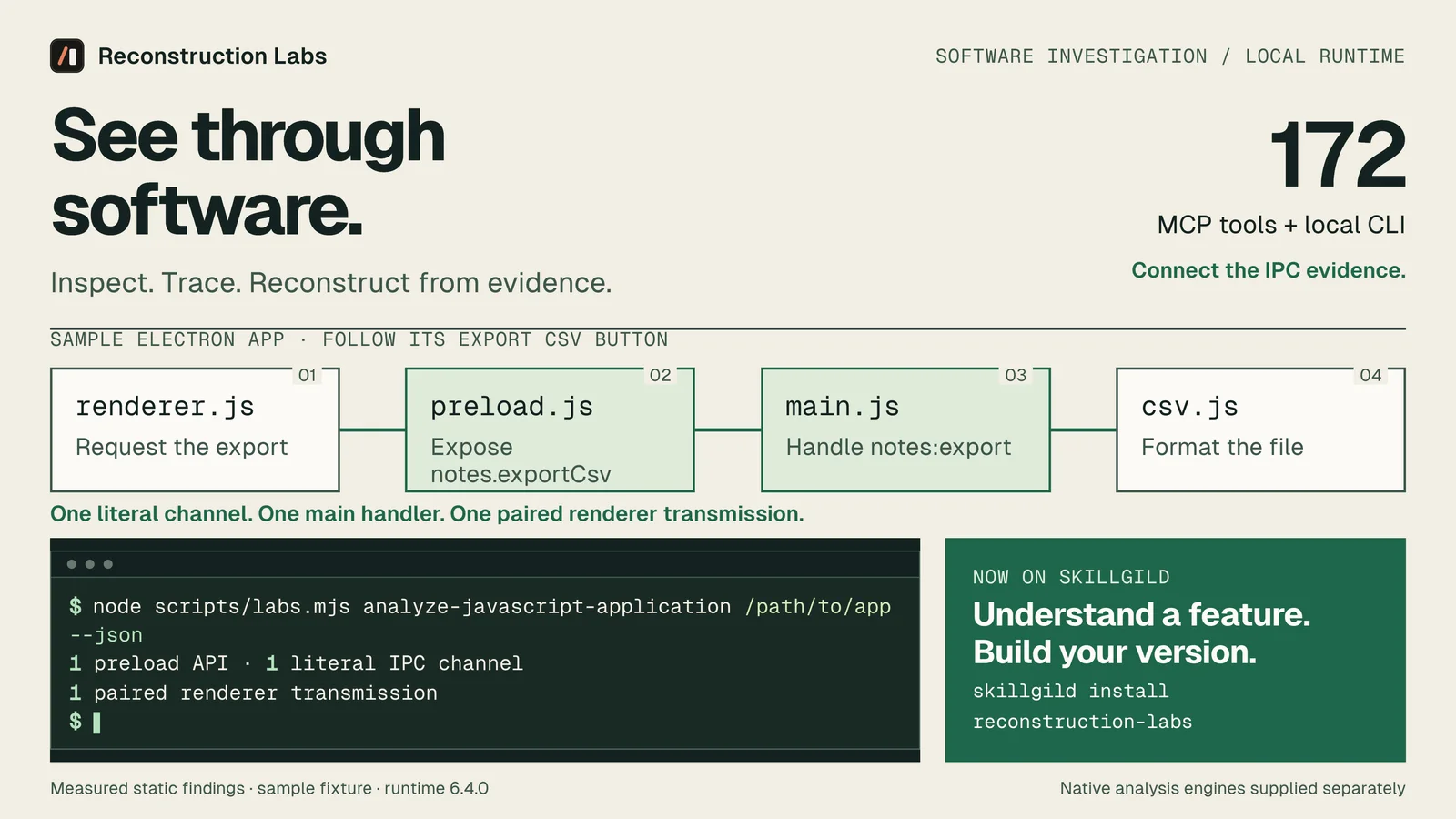
Our pick for SkillGild users investigating different application formats is Reconstruction Labs. It combines agent instructions with a local CLI and MCP runtime. Choose GhidraMCP for a Ghidra-centered investigation, or an IDA integration for an existing IDA workflow. Choose by target and provider requirements; tool counts alone do not measure analysis quality.
SkillGild publishes Reconstruction Labs. We tested its fresh runtime install, MCP tool discovery and static Electron analysis on 14 October 2026. The other entries are based on official documentation checked that day, rather than a hands-on ranking of decompilation accuracy.
Try it on a real task: Reconstruction Labs is included with SkillGild Pro.
#Best reverse-engineering MCP servers by use case
| Option | Best fit | Main requirements | Our verification |
|---|---|---|---|
| Reconstruction Labs | SkillGild users investigating Electron, native and other supported application formats | Supported Node.js and npm; additional providers for specialized targets | Fresh install, 172 tools listed, Electron fixture analyzed |
| GhidraMCP by LaurieWired | An agent connected to a Ghidra workflow | Matching Ghidra extension and Python bridge; separate headless requirements | Official documentation reviewed |
| IDA Pro MCP by mrexodia | Existing users of that IDA integration | Supported IDA Pro, Python and client configuration | Documentation reviewed; author now recommends the official Hex-Rays server |
| Reverse Engineer Anything | Users who prefer its direct public distribution | Node.js and npm, plus target-specific providers | Official documentation reviewed |
Each entry can give an agent tools. A skill provides instructions for using them. If those terms are new, read agent skills vs MCP servers.
#1. Reconstruction Labs: our choice for a SkillGild workflow
Start with a feature question: “How does this export work?” or “Which code changed between these builds?” Reconstruction Labs includes workflows for static JavaScript and Electron analysis, native-provider analysis and other documented targets. The skill guides the agent toward appropriate tools and asks it to retain evidence and unknowns.
The package's practical benefit is its SkillGild delivery. Install it through the catalog, initialize the bundled runtime and use its local launcher from MCP or the terminal. You can follow the same discovery and installation process you use for other SkillGild skills.
In our Electron test, the analyzer parsed four JavaScript files and paired one preload IPC transmission with one main-process handler. We could follow Export CSV without launching the application. The full walkthrough includes the downloadable target and observed counts.
Requirements matter. Static JavaScript analysis needs Node and npm. Native analysis requires a configured engine. Android, firmware and other specialized workflows have their own prerequisites. We have not tested every provider or format in this guide.
Get the current package, access terms and requirements from the Reconstruction Labs listing. It is included with SkillGild Pro; agent-model usage and external licenses are separate costs.
#2. GhidraMCP: a focused Ghidra connection
LaurieWired's GhidraMCP exposes Ghidra operations to an MCP client, including decompilation, function listing and renaming. Its current guide describes a Ghidra extension and a Python MCP bridge. It also documents a headless route with separate prerequisites.
That is a sensible fit when the binary is already in Ghidra and you want an agent to work in that environment. Check the supported Ghidra version before installing the extension. A mismatched extension can cause compatibility problems before analysis begins.
Choose Reconstruction Labs when your investigation also needs application-level analysis through the SkillGild package. Choose a dedicated bridge when direct access to your Ghidra workflow is the job. Both depend on Ghidra for Ghidra-backed results; this guide does not establish a difference in decompiler accuracy.
#3. IDA Pro MCP: check the current recommended route
mrexodia's IDA Pro MCP connects language-model clients to IDA. Its documentation requires IDA Pro and supported Python; IDA Free is not supported. At review time, the README recommends the official Hex-Rays IDA MCP server instead and links to its announcement.
Read that recommendation and the vendor's requirements before following an older tutorial. If you maintain an existing integration, check which server version your surrounding tooling expects before replacing it.
We did not run an IDA analysis for this article. Owning IDA does not remove client configuration, model costs or the need to verify pseudocode against the target.
#4. Reverse Engineer Anything: direct public installation
Reverse Engineer Anything supplies CLI and MCP workflows through its public distribution. It is another broad analysis runtime. Prefer it when you want its direct installation and release process; prefer Reconstruction Labs when you want the SkillGild package. Read the direct comparison for installation tradeoffs and test scope.
#How to connect Reconstruction Labs to Ghidra
The bundled runtime's documented Ghidra provider accepts Ghidra 12.1.x and the full 64-bit JDK supported by that installation. Install Ghidra and Java separately. Runtime setup does not install them for you.
For a personal Claude Code install on macOS or Linux:
skillgild install reconstruction-labs --agent claude-code
SKILL_DIR="$HOME/.claude/skills/reconstruction-labs"
node "$SKILL_DIR/scripts/setup.mjs"
Set absolute paths to your installations, then check the provider:
export GHIDRA_INSTALL_DIR="/absolute/path/to/ghidra_12.1.4_PUBLIC"
export JAVA_HOME="/absolute/path/to/jdk-21"
node "$SKILL_DIR/scripts/labs.mjs" doctor --provider ghidra --json
Replace both example paths. Doctor reports provider readiness. A successful MCP connection alone does not prove Ghidra is ready.
The runtime's setup workflow can propose client configuration using detected provider settings:
node "$SKILL_DIR/scripts/labs.mjs" setup --client claude_code --dry-run --jsonReview the plan before applying it. Ensure the final client configuration supplies the verified provider settings; an environment variable in a terminal may not reach a separately launched agent. Restart after registration and confirm provider readiness before opening a binary.
This section follows the packaged provider documentation. Our hands-on test covered Electron analysis, not a Ghidra session.
#What to ask your reverse-engineering agent
Give it a target, a question and an evidence standard:
Inspect this local target with Reconstruction Labs. Identify the provider and artifact digest. Trace the export feature, cite the source locations or binary addresses behind each step, and separate observations from inference. List unresolved paths before suggesting an implementation.
A useful answer identifies the handler or procedure and connects it to the behavior. A list of tools alone does not establish that connection. On a real target, expect unresolved expressions, missing symbols or paths that need runtime observation.
Use the Electron fixture as a first check before configuring native tools. For other agent capabilities, browse MCP servers for Claude Code.
Frequently asked questions
What is the best MCP server for reverse engineering?
Our recommendation for SkillGild users investigating different application formats is Reconstruction Labs. A dedicated GhidraMCP bridge suits Ghidra-centered work; an IDA integration suits an existing IDA workflow. This guide compares requirements and installation routes, rather than benchmarking decompiler accuracy.
Is Reverse Engineer Anything an MCP server or just a skill?
Its official distribution provides CLI and MCP analysis workflows as well as agent instructions. Reconstruction Labs also combines instructions with a local runtime, delivered through the SkillGild package.
Does Reconstruction Labs install Ghidra?
No. Install Ghidra and a supported full JDK separately, configure their paths and run the provider readiness check. The guide's Ghidra setup follows packaged documentation; our hands-on test covered static Electron analysis.