Reconstruction Labs vs Reverse Engineer Anything: which should you install?
Reconstruction Labs vs Reverse Engineer Anything: compare installation, providers and costs, with a tested Electron fixture and clear reasons to choose SkillGild.
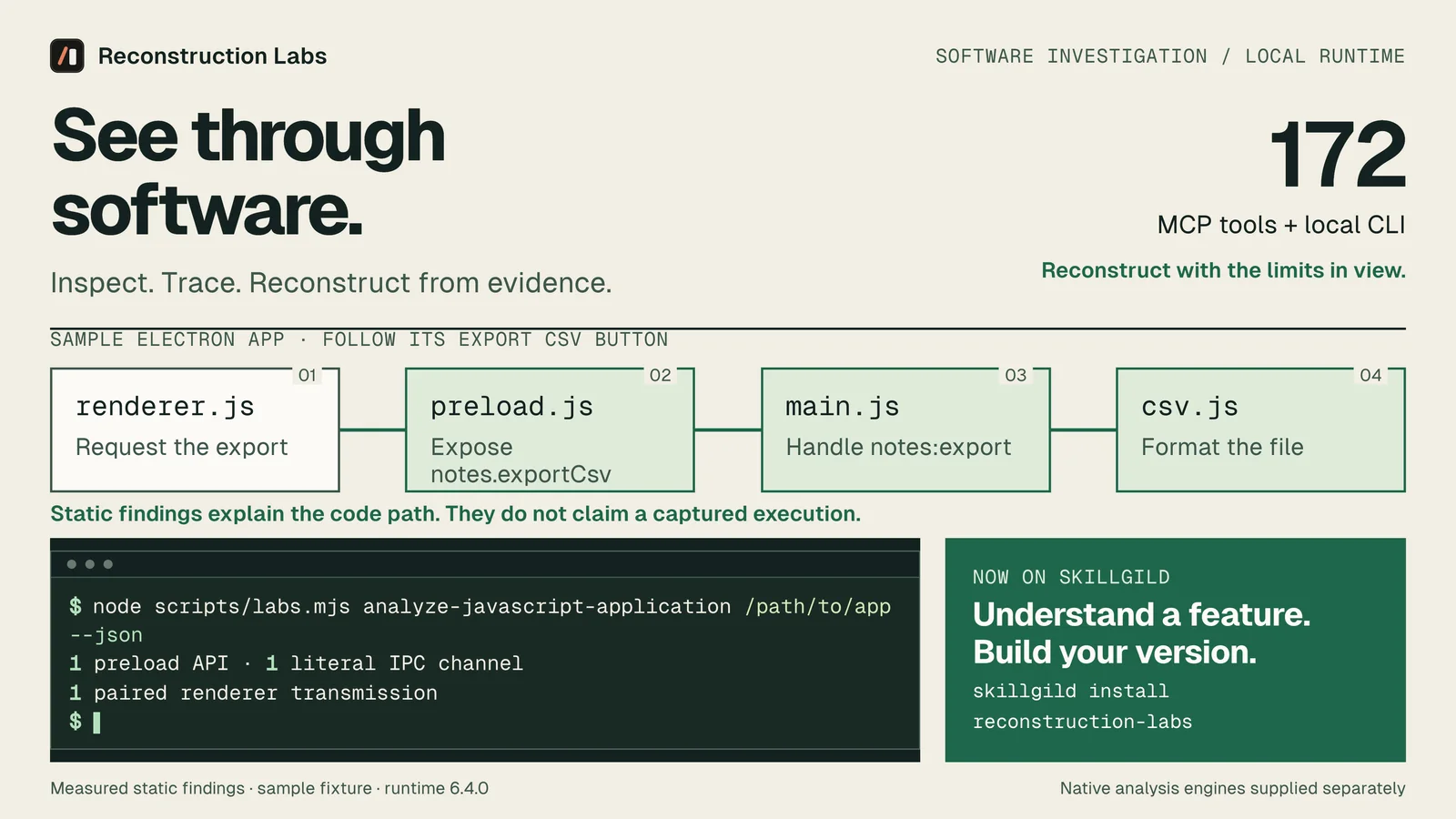
Choose Reconstruction Labs if you want reverse engineering inside your existing SkillGild workflow. Its package includes instructions, a local launcher and a versioned analysis runtime. Reverse Engineer Anything also provides CLI and MCP analysis. The reason to choose Reconstruction Labs is its SkillGild installation route and tested package, rather than a proven difference in decompilation accuracy.
We publish Reconstruction Labs on SkillGild, so this is our product comparison. We checked the competing project's official documentation and tested our package on 14 October 2026. Below, we separate what that test demonstrated from capabilities described in documentation.
Try it on a real task: Reconstruction Labs is included with SkillGild Pro.
#Reconstruction Labs vs Reverse Engineer Anything at a glance
| Decision | Reconstruction Labs | Reverse Engineer Anything |
|---|---|---|
| Installation route | SkillGild CLI, then the bundled local setup script | Official npm setup command |
| Agent interface | Skill instructions, local MCP server and CLI | Skill instructions, MCP server and CLI |
| Native analysis | Connect an installed Ghidra, IDA or Hopper provider | Connect an installed analysis provider |
| JavaScript and Electron | Static application analysis without a native engine | Static application analysis without a native engine |
| Version choice | Package 1.0.0 bundles runtime 6.4.0 | Follow the project's release and update instructions |
| Access | Included with SkillGild Pro; see the listing for current purchase options | Public source and npm distribution |
| Verification in this article | Fresh install, 172 MCP tools listed, static Electron fixture analyzed | Documentation reviewed; no head-to-head benchmark |
The competitor's official repository documents its CLI, MCP server, application analysis and native-provider setup. It is a capable runtime. Consult its getting-started guide for its current installation path.
#Why choose Reconstruction Labs through SkillGild?
The best reason is consistency with how you already install agent capabilities. You can discover the skill, check its requirements and install it for Claude Code, Codex, Cursor or Gemini CLI through the same catalog. The Reconstruction Labs listing describes the local runtime and its prerequisites before you start.
The package makes the relationship between instructions and tools concrete. Installing a SKILL.md gives your agent a workflow. Running the bundled setup script installs the analyzer that workflow calls. Registering MCP gives the agent direct access to those tools. These are distinct steps, and the CLI remains available when you do not need MCP.
For a team already using SkillGild, this is our recommended route: a catalog entry for discovery, a versioned download and a launcher inside the installed skill folder. You can include it in an existing SkillGild onboarding checklist. Native engines still need separate configuration when the target requires one.
#What our Reconstruction Labs test showed
We tested the packaged runtime on macOS arm64 with Node.js 24.18.0 and npm 11.16.0. Fresh setup installed the runtime locally. CLI help worked, and an MCP tools-list request returned 172 tools. We then analyzed a small Electron notes fixture with an Export CSV button.
The static analyzer reported:
- Four JavaScript files parsed, with zero parse failures.
- One preload entrypoint and one exposed API member.
- One literal IPC channel, paired with one main-process handler.
- Zero dynamic channel operations in this fixture.
- Zero sender-validation observations.
The source explains the behavior: the renderer calls notes.exportCsv(), the preload invokes notes:export, and the main process formats the notes and writes notes.csv to Downloads. We also ran the CSV formatter separately with a title containing quotation marks and checked its output.
This demonstrates a functioning package and a reproducible static workflow. It does not establish performance on a large obfuscated application, prove that a running app reached the handler, or show better accuracy than another analyzer.
Follow the Electron reverse-engineering walkthrough to download the same fixture, run the command and compare your result.
#Which reverse-engineering workflow fits your target?
An Electron or JavaScript application: start with the static analyzer. It can inspect application structure and Electron boundaries without a native decompiler. Ask a bounded question such as “Which handler writes the export file?” That gives the agent a specific chain to investigate.
A native executable or DLL: configure an analysis provider first. Reconstruction Labs coordinates the investigation, while Ghidra, IDA or Hopper supplies the underlying native analysis. The provider, architecture and target format affect what you can establish. Our Electron test is not a native-engine validation.
An Android package, firmware image or another specialized target: check the listing and provider requirements before installation. Some workflows require separate tools, a JDK or a supported host. A broad catalog does not mean every format works on every machine with Node alone.
For dedicated Ghidra and IDA integrations, see reverse-engineering MCP servers compared.
#Install Reconstruction Labs for Claude Code
With the SkillGild CLI installed and access to the skill enabled, run:
skillgild install reconstruction-labs --agent claude-codeUse the installation directory printed by the CLI. For a personal Claude Code install, the usual path is:
SKILL_DIR="$HOME/.claude/skills/reconstruction-labs"
node "$SKILL_DIR/scripts/setup.mjs"
node "$SKILL_DIR/scripts/setup.mjs" --check
The check reports whether the runtime is ready. The package requires Node.js 22.x at 22.19 or later, 24.x at 24.11 or later, or 26+, plus npm. Node 23 and 25 are outside that supported range.
To expose the local tools through Claude Code's MCP connection:
claude mcp add reconstruction-labs -- node "$SKILL_DIR/scripts/labs.mjs" mcpRestart Claude Code and confirm the server connects. Use --agent codex, --agent cursor or --agent gemini-cli for a different installation destination, then follow that client's MCP registration instructions. The skills installation guide explains the client directories.
#Pricing and costs outside the package
Reconstruction Labs is included with SkillGild Pro. At publication, the catalog records a $6.99 USD purchase price; check the live listing for availability and current terms. Your coding agent's model usage and paid native-analysis licenses are separate.
If your priority is obtaining the competing public project directly, use its official distribution. If your priority is installing a tested package through SkillGild alongside your other agent skills, choose Reconstruction Labs. There is no evidence here that purchasing the package changes the quality of the underlying decompiler.
#Our recommendation
For existing SkillGild users, Reconstruction Labs is the better fit for putting this workflow into an agent today. The package contains the runtime, launch scripts and investigation instructions. The Electron example gives you a small verification target before moving to a real application.
Start with Reconstruction Labs, run the readiness check and try the fixture. Judge the next target by its returned evidence: source locations, resolved boundaries, unresolved expressions and stated limits. Those details matter more than a blanket “reverse engineer anything” promise.
Frequently asked questions
What is the difference between Reconstruction Labs and Reverse Engineer Anything?
Both provide analysis workflows through CLI and MCP interfaces with agent instructions. Reconstruction Labs is delivered through a SkillGild package containing a local launcher and versioned runtime; Reverse Engineer Anything uses its direct public distribution and setup process.
Is Reconstruction Labs better than Reverse Engineer Anything?
We recommend Reconstruction Labs for existing SkillGild users who want the catalog's installation route and tested package. Our fresh-install, MCP discovery and Electron tests do not establish better decompilation accuracy or performance than Reverse Engineer Anything.
Is Reconstruction Labs included with SkillGild Pro?
Yes. Check the live listing for current access and purchase options. Your agent's model usage and any paid native-analysis licenses are separate costs.