Claude skills: what they are and how to use them
Understand Claude skills, choose workflows for design, video and coding, and find the right setup for Claude.ai or Claude Code.
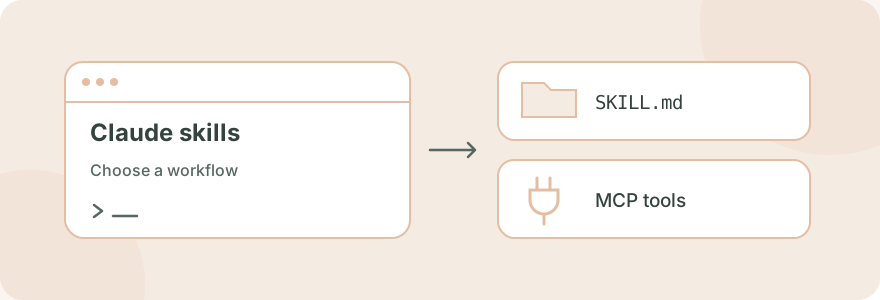
Claude skills package a repeatable workflow into instructions and supporting files. They give Claude a method for a task: how to review a design, prepare a document, plan a feature or make a research figure. Start by choosing your Claude environment, then choose a skill for the job you actually need to complete.
#What are Claude skills?
A skill normally has a SKILL.md file with a name, a description and instructions. It can also contain scripts, references and assets. The description helps the agent decide when to load the workflow. Skills extend how an agent works; installing one does not change its underlying model. See Anthropic's explanation of skills.
SkillGild is an independent marketplace for hosted agent skills. Its current setup supports Claude Code through a local CLI and MCP connection. Browse the skills catalog for current access, allowances and installation instructions.
#Claude.ai skills and Claude Code skills
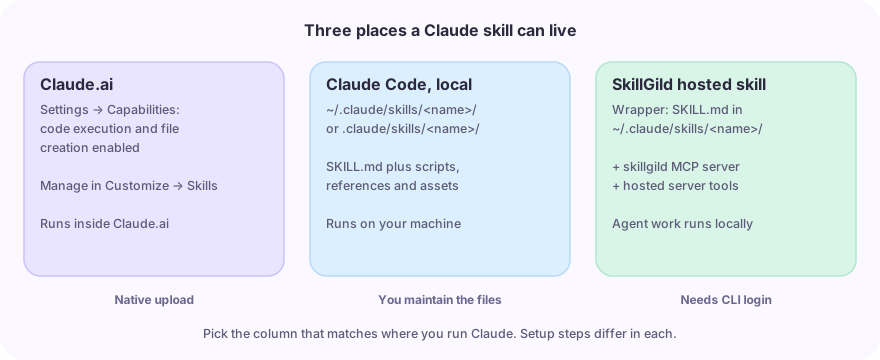
The setup depends on where you use Claude. A Claude.ai upload guide and a terminal installation guide describe different workflows.
| Environment | Where to start | What SkillGild supports here |
|---|---|---|
| Claude.ai | Manage enabled skills in Customize → Skills | This guide explains the native feature; the SkillGild installation below targets Claude Code |
| Claude Code on your machine | Put a skill folder in the project's or your user's skills directory | Install a public wrapper and connect the SkillGild MCP server |
| Other coding agents | Use that client's supported skill folder and MCP setup | Codex, Cursor and other MCP clients |
For Claude.ai, enable code execution and file creation in Settings → Capabilities, then manage skills in Customize → Skills. Organization policies can affect availability. Follow the official Claude.ai setup guide for current upload and account requirements.
For local Claude Code, follow how to install Claude Code skills. A personal skill folder on your laptop and a hosted execution connection have different requirements; check the guide for the environment you are using.
#Claude skill examples by job
Choose a workflow by its inputs and deliverables. These examples link to real SkillGild listings; the free Claude Code skills selection guide explains the catalog in more detail.
| Job | Skill | What to prepare |
|---|---|---|
| Improve a landing page or frontend | Taste Skill | The existing app, its audience and a concrete design brief |
| Design a logo | Logo Design | Brand name, positioning, constraints and required formats |
| Make a product launch video | Brag | The project you built and the story you want to show |
| Create an HTML-based video | HyperFrames | A scene plan, assets and timing |
| Prepare figures for a paper | Academic Plotting | Your actual results, axis labels and publication requirements |
| Plan a feature before editing code | OpenSpec Propose | A feature request and the project's existing specifications |
These workflows still need task-specific inputs and review. A plotting skill cannot infer missing measurements, and a design skill needs enough context to make appropriate choices.
#How to choose a Claude skills marketplace
Check what the marketplace delivers. A local skill directory may distribute the full instructions and scripts. SkillGild installs an invocation wrapper and provides access to hosted capabilities. Its hybrid skills give your agent session instructions while private server tools run on SkillGild; prompt skills return a hosted model result.
Before installing, check the listing's purpose, client support, public input schema, local dependencies and access allowance. For video work, also check the renderer and assets required. A download count or a large directory does not tell you whether a skill fits your project.
If you want free skills, check each listing's monthly run allowance. Free SkillGild access and your coding agent's model costs are separate. See pricing for current plan terms.
#Skills, MCP and project instructions
Skills provide task-specific procedures. MCP connects an agent to server capabilities. A project instruction file gives the agent ongoing context and conventions for that repository. These can work together: project instructions describe your codebase, a skill supplies a workflow, and an MCP tool performs a particular operation.
In SkillGild, the wrapper tells the agent how to start a hosted workflow. Copying that wrapper alone does not provide the private tools or their implementation. Read agent skills vs MCP servers for the execution details.
If you are deciding between a free repository and a hosted listing, read SkillGild vs free GitHub skills. For a worked task, see the research plots walkthrough.
#Start with one workflow
- Pick a task you expect to repeat, such as reviewing a frontend or creating a research figure.
- Open the relevant skill listing and read its requirements.
- Follow the Claude Code installation guide.
- Give Claude a complete brief, invoke the installed skill and review the result against your requirements.
If you use several coding agents, the CLI and coding-agent skills guide shows which setup belongs to each client.