OpenSpec: spec-driven development for Claude Code and Codex
What OpenSpec is, how propose, apply and archive work, what openspec init creates in Claude Code and Codex, and how it compares with Spec Kit and Kiro.
OpenSpec is a free, open-source tool that makes your AI coding agent write down what it is going to build before it builds it. Each change gets a short proposal, requirement specs, a design and a task list that you review first. Then the agent implements the tasks, and the agreed specs become the project's record of how the software should behave.
It is maintained by Fission AI under the MIT license. On October 5, 2026 the GitHub repository had about 71,000 stars and the current npm release was 1.14.0. This guide walks through the workflow, shows what openspec init actually creates, and explains where the OpenSpec Propose skill fits.
#What is OpenSpec?
AI agents are fast but drift when the requirements live only in chat history. OpenSpec adds a thin layer of Markdown files to your repository:
openspec/specs/holds the current truth: requirements and scenarios for each part of the system.openspec/changes/holds proposed changes, one folder each, until they ship.openspec/config.yamlholds optional project rules, such as "keep proposals under 500 words".
The specs are plain Markdown, with no special syntax to learn. OpenSpec's README describes the goal as agreeing on what to build "before any code is written". That planning step is called spec-driven development.
#How the OpenSpec workflow works
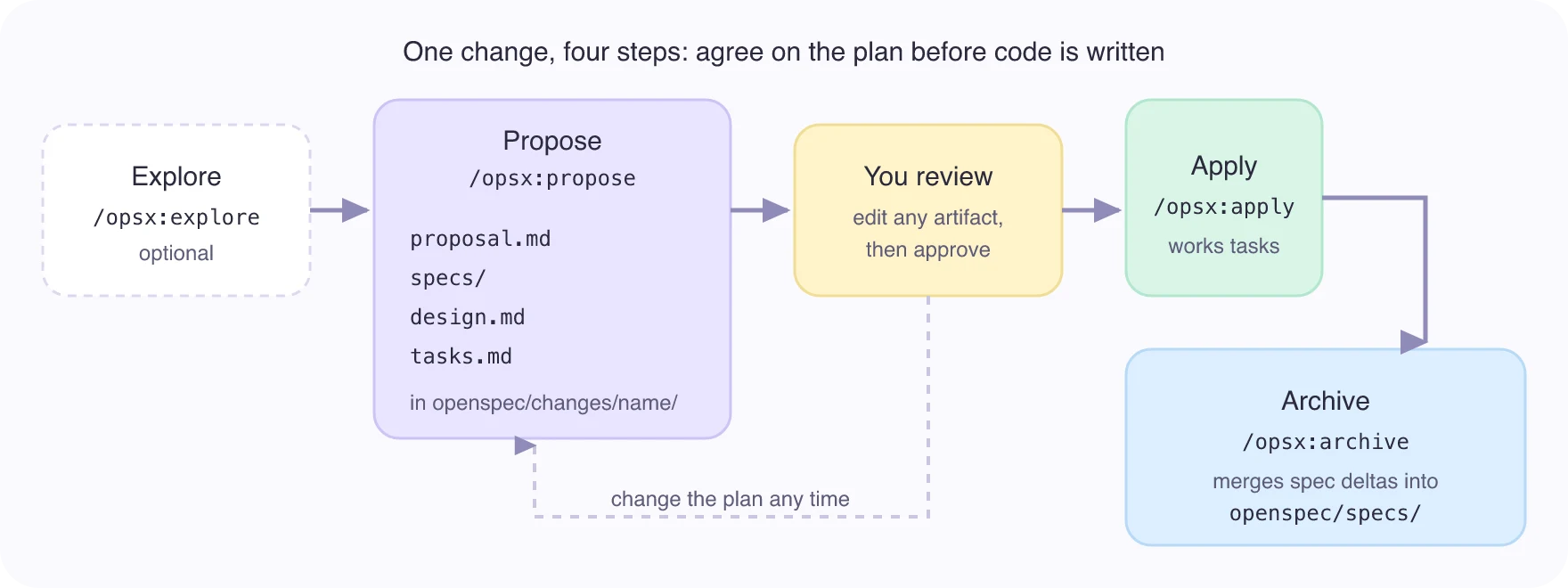
- Explore (optional).
/opsx:explorelets the agent read your code and weigh options before anything is written down. - Propose.
/opsx:propose add-dark-modecreatesopenspec/changes/add-dark-mode/with four artifacts:proposal.md(why and what),specs/(requirement changes),design.md(technical approach) andtasks.md(the checklist). - Review. You read and edit the artifacts. This is the point of the tool: you catch a wrong assumption in a page of Markdown instead of in a diff of 40 files.
- Apply.
/opsx:applyworks throughtasks.mdand ticks off each item. - Archive.
/opsx:archivemoves the finished change intoopenspec/changes/archive/and merges its spec changes intoopenspec/specs/.
OpenSpec calls itself "fluid not rigid": there are no phase gates, so you can update any artifact during apply.
#Install OpenSpec and run openspec init
OpenSpec needs Node.js 20.19.0 or later. Install it globally with npm, or with Homebrew on macOS and Linux:
npm install -g @fission-ai/openspec@latest
# or
brew install openspec
Then initialize it inside your project. The --tools flag skips the interactive picker:
cd your-project
openspec init --tools claude,codex
We ran exactly that on October 5, 2026, with OpenSpec 1.14.0, in an empty Git repository. This is the replayed output:
The run wrote these files:
.claude/
  commands/opsx/   apply, archive, explore, propose, sync, update (.md)
  skills/          openspec-apply-change, openspec-archive-change,
                   openspec-explore, openspec-propose,
                   openspec-sync-specs, openspec-update-change (SKILL.md each)
.agents/skills/    the same 6 skills, for Codex
openspec/
  config.yaml
  specs/
  changes/archive/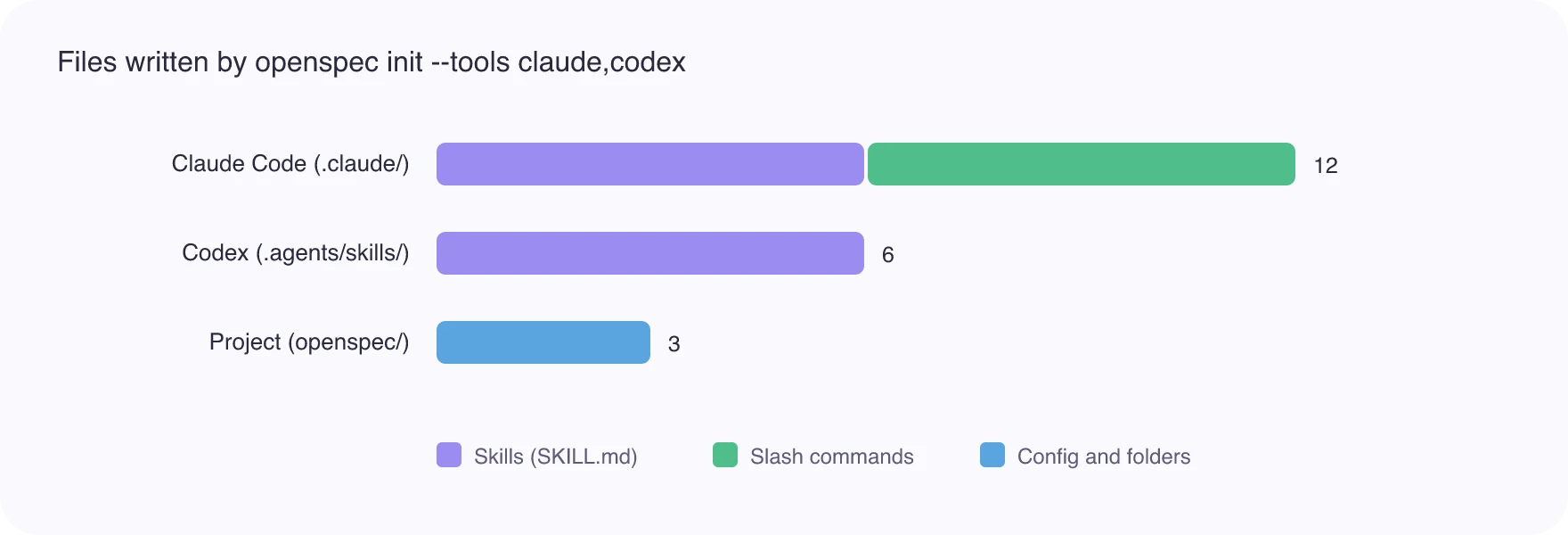
Two things are worth knowing from that output. First, OpenSpec installs its workflow as ordinary agent skills, the same SKILL.md format covered in how to install Claude Code skills and the Codex skills guide. Second, the default profile installs six workflows; six more (new, continue, ff, bulk-archive, verify, onboard) are added with openspec config profile.
#How to call OpenSpec in each agent
The command is the same idea everywhere, but the spelling differs. openspec init prints the right form for the tools you chose.
| Agent | Start a change | Source |
|---|---|---|
| Claude Code | /opsx:propose "your idea" |
init output |
| Codex CLI or IDE | $openspec-propose "your idea" |
init output |
| Codex desktop app | Pick openspec-propose under Skills in the sidebar | init output |
| Cursor, GitHub Copilot | /opsx-propose |
OpenSpec README |
| Amazon Q | @opsx-propose |
OpenSpec README |
OpenSpec lists support for more than 30 tools. Check its supported tools page for yours.
#What a change looks like
A spec change is written as a delta: what is added, modified or removed. This example is from OpenSpec's own README, for a dark-mode change:
## ADDED Requirements

### Requirement: Theme selection
The app SHALL let users switch between light and dark themes,
defaulting to the system preference.

#### Scenario: User toggles dark mode
- **WHEN** the user clicks the theme toggle
- **THEN** the app switches to dark mode and persists the choice
Each requirement has at least one scenario in WHEN and THEN form, so a reviewer can check the behaviour without reading code. When you archive the change, this block is merged into the matching file in openspec/specs/.
#Useful OpenSpec CLI commands
The slash commands run inside your agent. The openspec CLI runs in your terminal and helps you inspect and check the files. These come from openspec --help in version 1.14.0:
| Command | What it does |
|---|---|
openspec list |
Lists active changes; add --specs to list specs |
openspec show <name> |
Shows one change or spec |
openspec validate <name> |
Checks a change or spec for format problems |
openspec status |
Shows which artifacts of a change are complete |
openspec view |
Opens an interactive dashboard of specs and changes |
openspec archive <name> |
Archives a finished change and updates the main specs |
openspec update |
Refreshes agent instructions after you upgrade OpenSpec |
Run openspec validate before you approve a proposal. It catches a missing scenario or a malformed requirement that is easy to miss by eye.
#OpenSpec vs Spec Kit vs Kiro
These are the three names that come up most for spec-driven development. The descriptions of the other two below are OpenSpec's own comparison from its README, so read them as one side's view and check each project before you choose.
| OpenSpec | Spec Kit (GitHub) | Kiro (AWS) | |
|---|---|---|---|
| What it is | CLI plus agent skills | Spec toolkit | IDE |
| Works with | 30+ agents and editors | Several agents | Kiro's own IDE |
| Process | No fixed phase gates | Phase-gated, more Markdown | Built into the IDE |
| Setup | npm or Homebrew | Python | Install the IDE |
| License | MIT | Open source | Commercial product |
If you already work in Claude Code or Codex, OpenSpec is the lightest to try because it installs into the agent you use. For how skills and tool servers differ in general, see agent skills vs MCP servers.
#Run the propose step as a hosted skill
OpenSpec Propose on SkillGild packages the propose step as a hosted skill. It turns a feature request into an OpenSpec change before any code is written: proposal, delta specs, design and implementation tasks, grounded in the project's existing specs. Its source is the MIT-licensed openspec-propose skill in the OpenSpec repository.
Use it when you want the proposal workflow in an agent where you have not run openspec init, or across Claude Code, Codex, Cursor and Gemini CLI through one connection. Setup is in the quickstart for AI agents. If you already ran openspec init in a project, the local openspec-propose skill is already there and you do not need both.
For other skills that suit a coding workflow, see Claude Code skills for developers and the development category.
#When OpenSpec is worth it
Use it when:
- a change touches several files or people, and a wrong assumption is expensive;
- you want a reviewable record of why behaviour changed, next to the code;
- you hand work between sessions or agents and need the plan to survive a cleared context.
Skip it for one-line fixes and throwaway prototypes. The proposal costs a few minutes and a model call, and that only pays off when there is something to get wrong. OpenSpec's README also recommends high-reasoning models and a clean context window before you start implementing.
#Frequently asked questions
#Is OpenSpec free?
Yes. OpenSpec is open source under the MIT license and installs from npm or Homebrew. You still pay for the AI model your agent uses.
#Does OpenSpec work with Claude Code?
Yes. openspec init --tools claude installs six skills and six /opsx: slash commands into .claude/. Start a change with /opsx:propose "your idea".
#Does OpenSpec work with Codex?
Yes. For Codex it installs skills into .agents/skills/ and no slash commands. Start a change with $openspec-propose "your idea".
#What is the difference between OpenSpec and Spec Kit?
Both put a spec before the code. OpenSpec describes itself as lighter and without fixed phase gates; Spec Kit, from GitHub, uses a more structured phase-by-phase process. Try both on a small change if the choice matters.
Frequently asked questions
Is OpenSpec free?
Yes. OpenSpec is open source under the MIT license and installs from npm or Homebrew. You still pay for the AI model your agent uses.
Does OpenSpec work with Claude Code?
Yes. openspec init --tools claude installs six skills and six /opsx: slash commands into .claude/. Start a change with /opsx:propose followed by your idea.
Does OpenSpec work with Codex?
Yes. For Codex it installs skills into .agents/skills/ and no slash commands. Start a change with $openspec-propose followed by your idea.
What is the difference between OpenSpec and Spec Kit?
Both put a spec before the code. OpenSpec describes itself as lighter and without fixed phase gates; Spec Kit, from GitHub, uses a more structured phase-by-phase process.