How to add skills to your CLI and coding agent
Add skills to Claude Code, Codex CLI, Cursor and Gemini CLI. Compare skill folders, local workflows and hosted MCP connections.
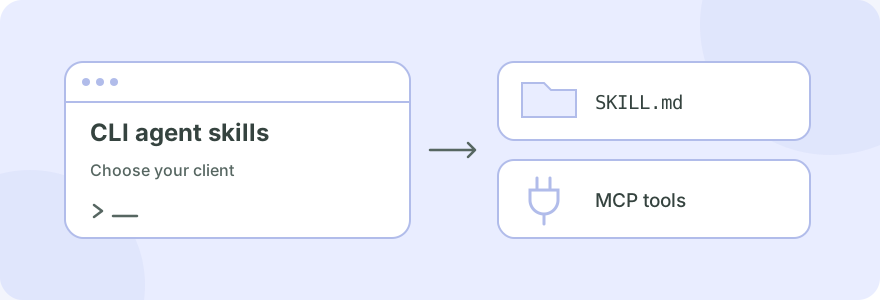
To add a skill to a coding agent, install its SKILL.md folder in a directory that your client discovers. If the skill uses hosted capabilities, also connect its MCP server and authenticate. The folder location and connection command depend on whether you use Claude Code, Codex, Cursor or another client.
#What are CLI skills and coding-agent skills?
In this context, a CLI skill is a reusable workflow for an AI agent you run from a terminal. It can contain instructions, scripts, references and assets. A coding-agent skill applies that workflow while the agent works with your project files. The Agent Skills standard describes the portable folder format; each client decides how to discover and invoke it.
A skill is also different from a standalone shell program. Installing a CLI executable adds a command. Installing a skill teaches an agent when and how to perform a task. Some workflows use both: SkillGild's CLI connects to hosted capabilities, while its local wrapper guides the agent's use of them.
#Pick the guide for your agent
| Client | SkillGild wrapper directory | Connection and installation guide |
|---|---|---|
| Claude Code | ~/.claude/skills/ |
Install Claude Code skills |
| Codex CLI | ~/.agents/skills/ |
Install Codex skills |
| Cursor | ~/.cursor/skills/ |
Cursor MCP setup for skills |
| Gemini CLI | ~/.gemini/skills/ |
Add skills to Gemini CLI |
| Another MCP client | Client-specific; SkillGild's shared preset writes ~/.agents/skills/ |
Connect your agent |
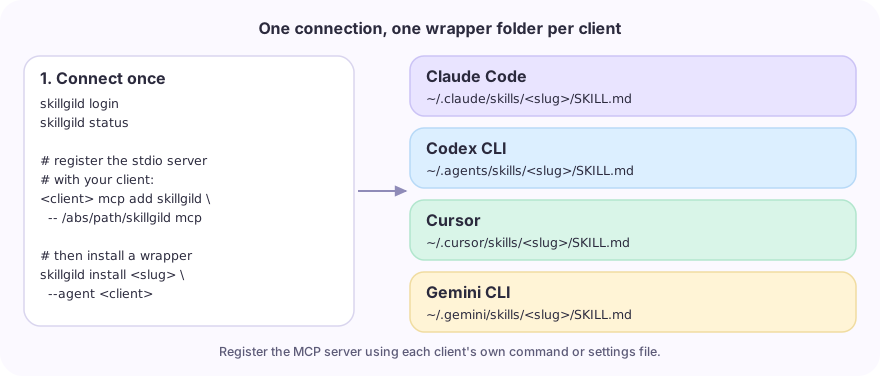
These are the directories selected by the SkillGild CLI presets. A shared folder only helps clients that discover that folder. An MCP client without native skill-folder discovery can still use supported server tools when given the appropriate workflow instructions.
#Add a hosted skill in five steps
- Choose the task. Read the catalog and select a workflow whose required input you can provide.
- Install the CLI. Follow the current source installation. It uses Go 1.26 or later; a one-line binary installer is still coming soon.
- Sign in. Run
skillgild loginand approve the displayed device code in your browser. - Connect your client. Follow the client guide above to register the local
skillgild mcpstdio server with its absolute executable path. - Install and invoke the wrapper. Choose the matching agent preset, then ask your coding agent to use that workflow.
For example, after connecting Codex:
skillgild install academic-plotting --agent codexThen give Codex your actual experimental results and ask it to use Academic Plotting. Check the skill listing for required inputs and its current allowance. Do not ask it to invent data to fill an incomplete brief. The research plots walkthrough shows a complete brief, script and checklist for this kind of task.
#Add a local skill instead
For a workflow you own, create a folder in your client's project or user skills directory. Include SKILL.md with the skill's name, a description of when it should activate, and concrete steps. Keep any referenced files alongside it. The Claude Code and Codex guides include a minimal example.
Local files and hosted wrappers have different dependency requirements. A local instruction-only workflow can operate without SkillGild. A hosted wrapper needs its connected service even though the agent can read the wrapper offline. See agent skills vs MCP servers for the distinction.
#Choose useful skills for your coding agent
| Work you want to repeat | Example |
|---|---|
| Frontend design and website redesign | Taste Skill |
| Planning a change against existing specs | OpenSpec Propose |
| Publication figures from real research data | Academic Plotting |
| Code-rendered video and product launches | HyperFrames or Brag |
The workflow selection guide groups the current catalog by job. Start with one workflow, inspect its output and dependencies, and add further skills when you have a clear use for them.
#Check discovery and execution separately
First confirm that your agent sees the skill. Then confirm its MCP server is connected. Finally inspect the returned result or error from a task. These are separate checks: a visible SKILL.md does not prove that authentication, quota or a local rendering dependency is ready.
For SkillGild hybrid skills, starting a session uses one allowance run; subsequent server calls consume that session's tool-call budget. Prompt skills use hosted execution through skillgild_run_skill. The core concepts and API reference describe those runtime details.