Claude Code plugins: install, build and publish
What a Claude Code plugin is, how it differs from a skill, the /plugin commands, what goes in plugin.json and marketplace.json, how to test with --plugin-dir, and how to publish your own marketplace.
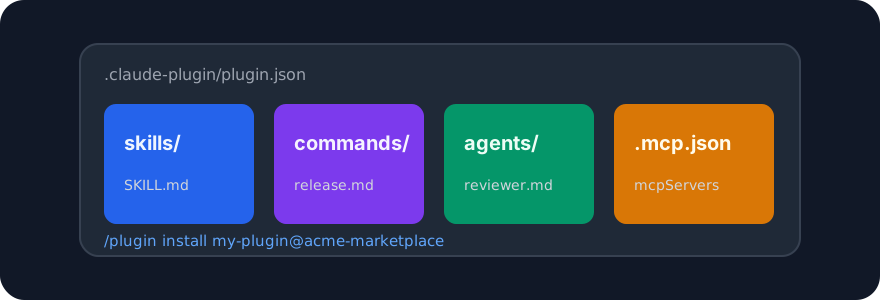
A Claude Code plugin bundles skills, slash commands, subagents, hooks and MCP servers so they install together from a marketplace with one command. This guide explains what goes in a plugin, how to install one, how plugins differ from plain skills, and how to publish your own marketplace.
Try it on a real task: Academic Plotting is free for 25 runs a month.
#Plugin or skill?
A skill is one folder with a SKILL.md: instructions for one job. A plugin is a package that can contain many skills plus other extensions, with a manifest that tells Claude Code what is inside.
| You want to | Use |
|---|---|
| Teach Claude one method | A skill |
| Ship several skills together | A plugin |
| Add a slash command or a subagent alongside skills | A plugin |
| Connect an MCP server that the skills depend on | A plugin with .mcp.json |
| Let a team install everything with one command | A plugin in a marketplace |
| Install one community skill from GitHub | skillgild install <slug> (no plugin needed) |
Most of the popular skills on SkillGild ship both ways: as a plain folder you can copy, and as a plugin in the author's marketplace. Anthropic's own skills, such as Frontend Design and Code Review, are published as plugins in the claude-plugins-official marketplace.
#Installing a plugin
Marketplaces are Git repositories (or local folders) that contain a .claude-plugin/marketplace.json. Add a marketplace, then install plugins from it:
/plugin marketplace add anthropics/claude-plugins-official
/plugin install frontend-design@claude-plugins-official
/plugin on its own opens a browser where you can search marketplaces, install, enable, disable and uninstall. Installed plugins apply to every project by default; team settings can pin a marketplace and a plugin list for a repository so everyone gets the same set.
Other marketplaces people add most often, from the skills listed on SkillGild:
/plugin marketplace add obra/superpowers-marketplace
/plugin install superpowers@superpowers-marketplace

/plugin marketplace add pbakaus/impeccable
/plugin install impeccable@impeccable

/plugin marketplace add makenotion/notion-workspace-plugin
/plugin install notion-workspace@notion-workspace-plugin
Each listing on SkillGild shows the plugin commands when the project publishes them, next to the one-line skillgild install that copies the skill folder without the plugin.
#What is inside a plugin
my-plugin/
├── .claude-plugin/
│   └── plugin.json       # name, description, version, author
├── skills/
│   └── paper-figure/
│       └── SKILL.md
├── commands/
│   └── release.md        # a slash command
├── agents/
│   └── reviewer.md       # a subagent
├── hooks/
│   └── hooks.json        # run scripts on events
└── .mcp.json             # MCP servers the plugin needs
Only the manifest is required:
{
  "name": "my-plugin",
  "description": "Figures, release notes and a reviewer for our papers repo.",
  "version": "1.0.0",
  "author": { "name": "Your Name" }
}
Everything else is optional and discovered by folder: skills in skills/, commands in commands/, agents in agents/. When the plugin is installed, its skills behave like personal skills, and its commands appear in the slash menu namespaced by plugin.
#Building one
- Write and test the skills on their own first, in
~/.claude/skills/, following how to create a Claude skill. A plugin does not fix a skill that does not trigger. - Create the plugin folder and move the skills into
skills/. - Add the manifest.
- Test locally without publishing:
claude --plugin-dir ./my-plugin- Validate the structure:
claude plugin validate ./my-plugin- Commit it to a repository.
Keep plugins small. One plugin per job area ("release tooling", "design review") installs faster, reads better in the browser and is easier to disable when it misfires.
#Publishing a marketplace
A marketplace is a repository with a .claude-plugin/marketplace.json that lists plugins and where to fetch them:
{
  "name": "acme-marketplace",
  "owner": { "name": "Acme" },
  "plugins": [
    {
      "name": "my-plugin",
      "source": "./plugins/my-plugin",
      "description": "Figures, release notes and a reviewer for our papers repo."
    },
    {
      "name": "design-review",
      "source": { "source": "github", "repo": "acme/design-review" },
      "description": "A design review skill and a /review command."
    }
  ]
}
Plugins can live inside the marketplace repository (relative source) or in their own repositories. People then run /plugin marketplace add acme/acme-marketplace and install by name. Anyone with the repository URL can add it; there is no central approval.
#Plugins and MCP servers
A plugin can declare MCP servers in .mcp.json so a skill's tools arrive with it. SkillGild's own hosted skills work this way: the SkillGild MCP server exposes skillgild_search_skills, skillgild_run_skill and the session tools, and a skill's wrapper tells Claude how to call them. If you publish a plugin for a team that uses SkillGild, add the server once in .mcp.json:
{
  "mcpServers": {
    "skillgild": {
      "command": "skillgild",
      "args": ["mcp"]
    }
  }
}
Every team member who installs the plugin then has the hosted catalog available by name, after skillgild login.
#Troubleshooting
- The marketplace will not add. The repository must be public (or you must have Git access to it) and contain
.claude-plugin/marketplace.jsonat the root. - A plugin installs but its skill never triggers. The skill's
descriptiondoes not match how you ask. Fix the description; reinstall is not needed for local--plugin-dirtesting. - Two plugins define the same command name. Commands are namespaced by plugin, so both exist; type the plugin prefix to pick one.
- A plugin needs a tool you do not have. Check the README for binaries and API keys. A plugin cannot install system software for you.
For the differences between every extension type, read skills vs agents, commands and plugins. To see which MCP servers people add alongside plugins, read the best MCP servers for Claude Code.
Frequently asked questions
What is a Claude Code plugin?
A package that bundles skills, slash commands, subagents, hooks and MCP servers with a .claude-plugin/plugin.json manifest, so they install together from a marketplace with /plugin install.
How do I install a Claude Code plugin?
Add the marketplace with /plugin marketplace add owner/repo, then run /plugin install name@marketplace. /plugin on its own opens a browser to search, enable, disable and uninstall.
What is the difference between a plugin and a skill?
A skill is one folder with a SKILL.md: instructions for one job. A plugin is a delivery package that can hold many skills plus commands, agents, hooks and MCP servers. One community skill does not need a plugin; skillgild install or a copied folder is simpler.
How do I publish my own plugin marketplace?
Create a repository with a .claude-plugin/marketplace.json that lists each plugin's name, source and description. Anyone can add it with /plugin marketplace add; there is no central approval.