Master the Logo Design Skill for Claude and AI Agents
Learn how Claude Code and SkillGild's logo design skill automate geometric SVG branding and brand guidelines directly within your development workflow.

Use the SkillGild Logo Design skill to convert brand briefs into scalable vector graphics (SVG) via the Model Context Protocol (MCP). Avoid treating Claude like a pixel-based generative tool such as Midjourney. Claude cannot reliably write error-free SVG code or manage geometric constraints through raw prompting alone. It requires a dedicated skill to serve as a validator and rendering engine because it lacks the spatial reasoning to close complex paths independently.
Install the SkillGild Logo Design skill to Claude Code, Cursor, or other AI agents using this technical workflow to generate production-ready assets. This process helps you distinguish between geometric symbols, which the MCP skill handles with 2026-era precision, and organic illustrations that require manual designer intervention. Follow these steps to deploy a hosted skill that generates the visual mark alongside detailed color, typography, and spacing rules. You can then chain these outputs directly into automated frontend development pipelines.
Key takeaways
- Claude can generate production-ready SVG logos when provided with a specialized skill that handles geometric constraints and brand logic.
- SkillGild's Logo Design skill outperforms raw prompting by hosting protected brand-logic servers that ensure SVG validity and geometric precision.
- Developers should use the Logo Design skill for rapid prototyping and brand guideline generation, but switch to manual refinement for complex illustrative marks.
- Integration via MCP (Model Context Protocol) allows Claude to write logo assets directly into your project's asset directory.
- Check for 'geometric hallucination' in raw Claude outputs to determine when you need to upgrade to a hosted SkillGild workflow.
Try it on a real task: Logo Design is free for 25 runs a month.
#Table of contents
- Claude designs logos through specialized MCP skills that bridge LLM logic with geometric rendering.
- Hosted skills solve the geometric hallucination problem in raw LLM output
- Install the design skill to your agent via the SkillGild marketplace
- Identify the boundary where automated SVG generation requires manual designer intervention
- Generate comprehensive brand guidelines alongside the visual mark
- Generate full brand guidelines alongside the visual mark
- Verify SVG integrity using the SKILL.md checker before deployment
- Scale design production by chaining the logo skill with frontend workflows
- Frequently asked questions
- Deciding to Integrate AI Into Your Design Workflow
#Claude designs logos through specialized MCP skills that bridge LLM logic with geometric rendering.
Claude does not "draw" in the traditional sense of a human artist or a raster-based image generator. Instead, it operates via the Model Context Protocol (MCP) to connect linguistic reasoning with technical execution. When a user provides a brand brief, Claude processes the creative intent through specialized skills that function as an interface between the Large Language Model (LLM) and a rendering engine. This workflow allows the model to move beyond descriptive text and generate functional, high-fidelity SVG code and brand guidelines that specify color palettes, typography, and spacing rules.
To initiate this process, a designer connects Claude to a hosted design skill. The LLM analyzes the brand attributes, such as industry, typography preferences, and color theory, and maps these requirements to geometric instructions. Rather than guessing at pixel placement, the MCP skill translates the model's logic into valid, scalable vector geometry. Professionals looking to implement these workflows can find vetted tools in the Best Claude Skills for Design & Frontend directory, which lists resources for connecting LLMs to production-ready design environments.
This mechanism serves as the primary method for ensuring brand consistency across AI-generated assets. Because the output is code-based rather than a flat image file, the resulting logos remain fully editable and mathematically precise. The hosted skill acts as a validator, ensuring that the vector coordinates and paths generated by Claude adhere to standard SVG specifications, which prevents the structural errors often found in raw LLM outputs. This structured approach allows a brand brief to be transformed into a scalable asset without losing the nuance of the original creative direction.
#Hosted skills solve the geometric hallucination problem in raw LLM output
Avoid geometric hallucinations in logo design by using hosted skills instead of raw prompting. Raw output often produces visually plausible but technically broken code because Large Language Models rely on probabilistic token prediction rather than spatial reasoning. They frequently fail at the coordinate math required for complex vector graphics. Common failures include unclosed SVG paths or misaligned anchor points that appear correct in a browser preview but fail in professional editing software. These spatial errors occur because the model lacks a native geometric engine to verify that the start and end coordinates of a shape meet.
Eliminate these errors by deploying the SkillGild Logo Design skill as a specialized validator and geometric constraint engine. Instead of allowing the LLM to output raw, unverified code, the skill intercepts the model’s intent and passes it through a series of mathematical checks. This process ensures that every bezier curve and path follows strict geometric rules. It prevents the overlapping nodes and broken loops typical of raw output. By enforcing these constraints, the tool transforms Claude from a text generator into a precision design instrument capable of producing technically sound vector data.
Adopt assets that are immediately functional to meet the requirements of professional workflows. While raw prompting might provide a creative starting point, it necessitates an additional stage of "cleanup" in vector software to fix non-manifold geometry or invalid color definitions. The SkillGild skill acts as a bridge between creative intent and technical execution, ensuring the output is a production-ready asset. Designers focusing on high-level Design engineering apply these hosted skills to bypass the troubleshooting phase entirely, moving directly from prompt to deployment.
Assess the technical gap between general-purpose prompting and specialized skills through the reliability of the final file. In a professional environment, a logo must maintain its integrity across various scales and formats without requiring a developer to rewrite the underlying SVG. The following table illustrates how a specialized skill mitigates the common failures associated with raw model output.
| Feature | Raw Claude Prompting | SkillGild Logo Design Skill |
|---|---|---|
| Path Precision | High risk of unclosed paths or coordinate errors. | Mathematically validated paths and closed loops. |
| Brand Guideline Generation | Variable consistency based on context window. | Enforced adherence to specific brand parameters. |
| Asset Exporting | Requires manual copy-pasting of SVG code. | Direct export of production-ready vector formats. |
| Color Theory Consistency | Occasional hallucination of invalid hex codes. | Enforced palette logic based on color science. |
#Install the design skill to your agent via the SkillGild marketplace
Integration begins by accessing the SkillGild marketplace to locate the specific logo design skill tailored for agentic workflows. Users operating Claude Code or Cursor must pull the skill definition directly into their local environment via the provided CLI tools. The process requires executing a terminal command that fetches the necessary configuration files and registers them within the AI agent’s active execution path. Once the command is executed, the agent immediately recognizes the new design capabilities, allowing it to interpret brand-specific prompts and output structured design assets without requiring manual configuration of the underlying language model’s system prompt.
The core functionality of the logo design skill for Claude relies on the SKILL.md format. This standardized documentation structure defines the agent’s operational constraints, style guides, and specific tool usage patterns. The SKILL.md file acts as the essential bridge between raw LLM capabilities and professional design outcomes, ensuring the agent adheres to rigorous logo principles such as scalability, geometric balance, and color theory. Supporting this logic is the Model Context Protocol (MCP) server, which handles the heavy lifting of brand logic and asset rendering. The MCP server processes complex design requests, manages the generation of vector paths, and ensures that the resulting files meet high-fidelity technical standards for professional use. By offloading these tasks to a dedicated protocol, the agent avoids the common errors and hallucinations often associated with direct SVG generation in a standard chat interface.
Finalizing the installation involves verifying the connection between the AI agent and the local or remote MCP server. Users should check the agent’s status output to ensure the design toolset is active and ready to receive creative briefs. For those requiring a detailed technical walkthrough, specific configuration flags enterprise environments, or troubleshooting for custom IDE integrations, the Claude Code Skills Marketplace: Install Skills provides the definitive technical documentation. Successfully integrating these tools transforms a general-purpose coding assistant into a specialized design engine capable of producing production-ready brand marks that are consistent with established corporate identities.
#Identify the boundary where automated SVG generation requires manual designer intervention
Determine the project scope by categorizing the visual requirements into mathematical or fluid forms. Claude and associated design skills operate with peak efficiency when generating geometric and symbolic logos. These marks rely on clean lines, perfect circles, polygons, and calculated symmetry. Because SVG code is inherently structural, the AI excels at maintaining the mathematical integrity required for minimalist brand marks and modern tech emblems. A professional should rely on the skill for final production assets when the brief calls for high-contrast, grid-based iconography that can be defined through precise coordinate points and standard CSS color values.
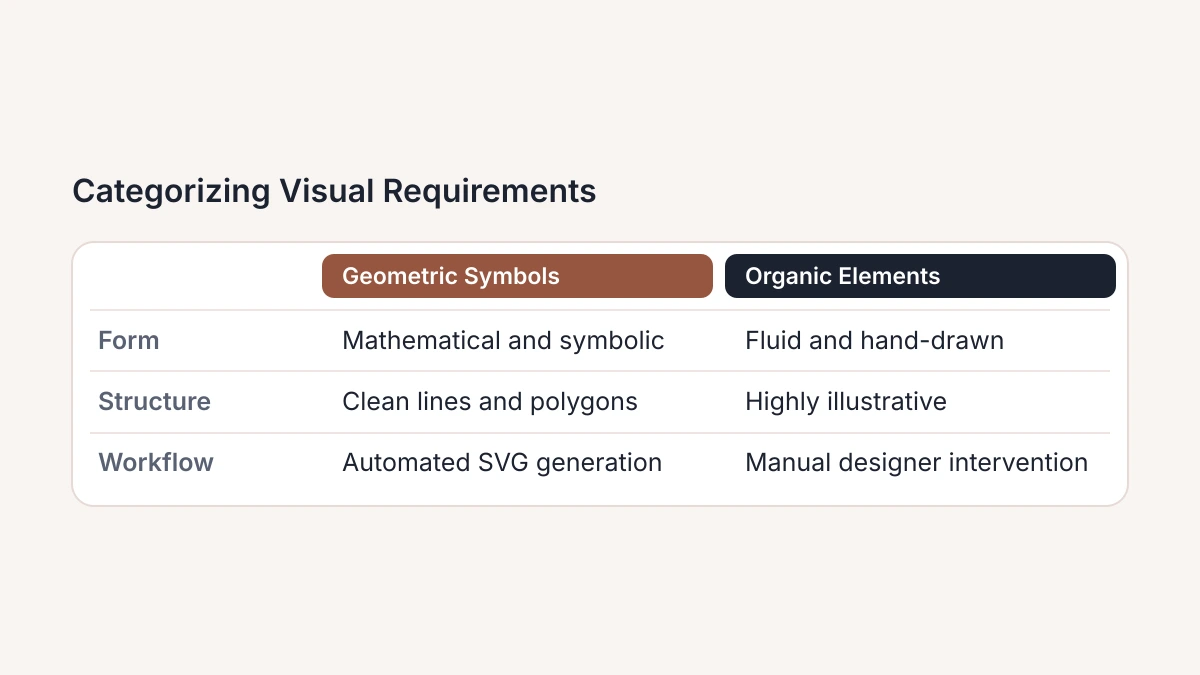
Shift to a manual designer or a specialized illustrator when the brief demands organic, hand-drawn, or highly illustrative elements. While Claude can generate the code for complex paths, it frequently struggles with the "gestural" quality of human artistry. If a brand identity requires a mascot with expressive features, a logo with the texture of a linocut print, or intricate botanical flourishes, the automated output will likely appear clinical or structurally awkward. In these scenarios, use the skill to generate raw SVG components or layout ideas, then export the code into a professional vector editor for a human specialist to refine the Bézier curves and add tactile character.
Distinguish between visual execution and the navigation of nuanced cultural metaphors. A logo is a semiotic tool, and while an AI agent can synthesize common associations, it lacks the lived experience to navigate deep cultural sensitivities or avant-garde subversion. When a brand strategy hinges on a complex double-entendre or a subtle nod to a specific historical movement, the skill serves best as a sophisticated mood-board generator. The professional must act as the primary filter, using the AI to iterate through hundreds of visual metaphors in seconds, then selecting the most viable concept for a human designer to rebuild with intentionality.
Establish a clear "stop-loss" point for prompt engineering. If achieving the desired curve or specific weight of a "hand-lettered" font requires more than five rounds of prompt refinement, the task has crossed the boundary into manual territory. Continuing to iterate within the AI environment at this stage creates a cycle of diminishing returns. At this juncture, the most efficient workflow is to take the best generated SVG draft and hand it to a specialist who can provide the final ten percent of polish that transforms a generated shape into a professional brand asset.
#Generate comprehensive brand guidelines alongside the visual mark
#Generate full brand guidelines alongside the visual mark
Use the Logo Design skill for more than just creating a vector path. Professional branding requires a set of rules and specifications to remain consistent across different media, even though the visual mark is the centerpiece. When you prompt Claude to apply this skill to build a full visual identity, you can automate the generation of technical requirements that usually require manual work. This approach ensures the output is a functional toolset brand standards rather than just an isolated graphic.
Documenting color spaces is a primary requirement for any professional handoff. The Logo Design skill enables Claude to define a primary and secondary palette, providing values in HEX for web development, RGB for digital displays, and CMYK for print production. The skill also calculates typography scales to establish a hierarchy of headings and body text that matches the logo's geometry. This prevents the common problem where a logo looks professional on its own while the surrounding marketing materials appear disjointed.
Claude organizes these specifications into structured documentation, which is typically formatted as a README.md or BRAND.md file within the project directory. This file serves as the single source of truth for the identity system. It outlines clear usage rules such as minimum clear space, prohibited color combinations, and scaling limits. If you need to integrate these assets into broader web projects, the Claude Frontend Design Skill by Anthropic provides the bridge between static brand rules and interactive UI components.
Instruct the agent to output these guidelines as part of the initial generation cycle. Use a single prompt to specify the delivery of a full identity package instead of requesting a logo and then asking for colors separately. This approach ensures the AI agent maintains context across the entire design system. It links the specific curves of the SVG mark to the mathematical ratios used in the typography scale. The resulting documentation allows any developer or designer to implement the brand with precision, which removes the ambiguity that often affects AI-generated creative work.
#Verify SVG integrity using the SKILL.md checker before deployment
Run your generated SVG code through the SkillGild browser-based validator before you commit the asset to a project. This tool parses the XML structure to confirm the logo follows the open Agent Skills standard. It identifies malformed tags or unsupported CSS properties that AI models sometimes inject during generation. Validating the code immediately after you create it confirms that the file is a functional code snippet ready for programmatic injection, rather than just a visual preview.
Follow the SKILL.md specification to ensure the logo functions as a portable tool instead of a static image. This portability allows you to move design assets between different development environments, such as Cursor or the Gemini CLI. A verified skill functions reliably across diverse coding agents. This prevents the rendering errors that occur when an agent attempts to manipulate a non-standard SVG structure. If you are integrating these assets into automated cloud pipelines, consult the technical documentation on Vercel: Claude Skills and Agent Skills to see how these standards facilitate cross-platform deployment.
Do not skip this quality assurance step, as it prevents broken assets from entering the codebase. Broken assets often cause layout shifts or rendering failures in 2026-era web frameworks. The checker acts as a final gate, stripping away redundant metadata often left behind by vector export tools or raw AI outputs. This optimization produces a lean, compliant file that agents interpret without latency. This process ensures your brand identity remains consistent regardless of which AI tool serves or modifies the component within the application UI.
#Scale design production by chaining the logo skill with frontend workflows
Sophisticated workflows treat the output of the Logo Design skill not as a final destination, but as the initial seed for "skill chaining." This process involves passing the optimized SVG data directly into a secondary Frontend Design skill or a UI-specialized agent. Instead of treating the logo as a static image file, the user prompts Claude to interpret the vector’s path data and color palette as the foundational logic for an entire application interface. This eliminates the manual handoff between brand design and interface development, ensuring the visual anchor of the project dictates the subsequent aesthetic choices.
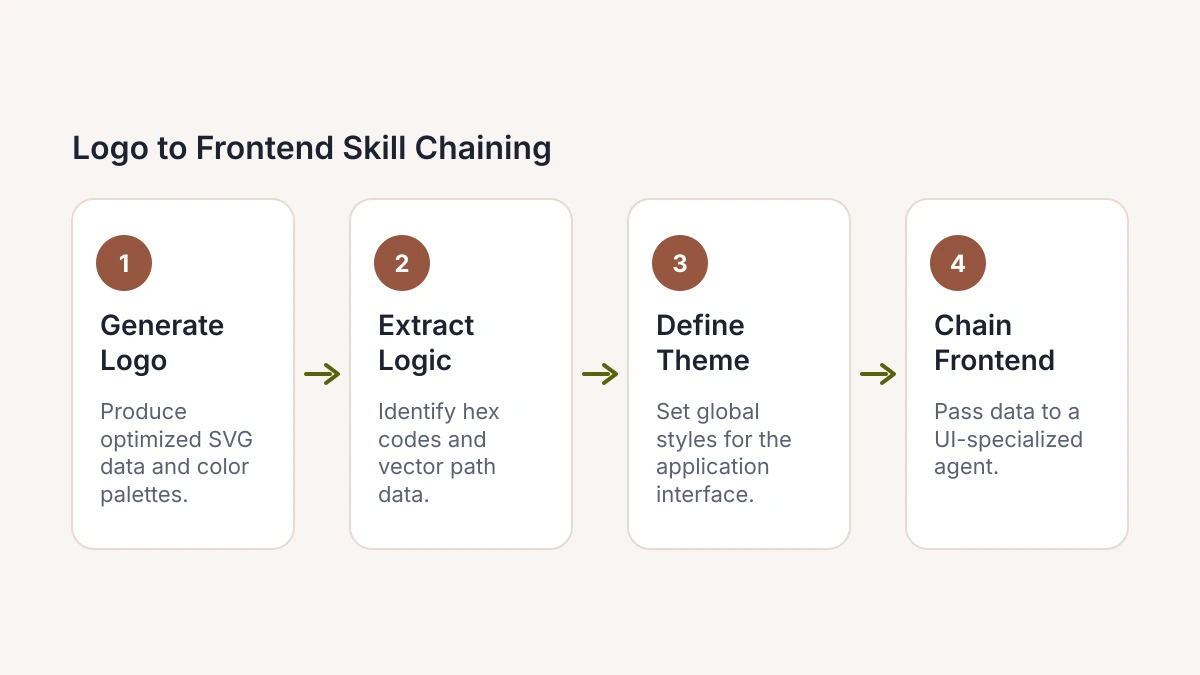
Implementation requires instructing the agent to extract primary and secondary hex codes from the generated logo to define a global theme, such as a Tailwind CSS configuration or a CSS-in-JS object. By chaining these skills, the agent automatically populates a landing page header, favicon, and hero section using the exact proportions and strokes of the new brand. A single coordinated prompt sequence can move from a conceptual mark to a functional React component where the logo is already integrated, responsive, and accessibility-tested across different viewport sizes without human intervention.
This pipeline transforms logo design from an isolated creative task into the functional starting point of an automated development lifecycle. Treating the logo as a structured data object allows professionals to generate brand-compliant interfaces with high velocity. This approach reduces the friction of iterative design, enabling the rapid deployment of micro-sites or internal tools where the visual identity is established and applied programmatically across the entire frontend stack from the moment the vector is rendered.
#Frequently asked questions
#how to install claude skills
Install Claude skills by selecting your tool in the SkillGild marketplace and following the automated prompts to update your environment configuration. This process modifies your claude_desktop_config.json to include the necessary MCP server parameters and authentication keys. After the installation script completes, restart your Claude instance to initialize the new design capabilities in your chat interface.
#can claude design logos in svg format
Claude generates production-ready SVG logos by leveraging specialized MCP skills that translate design prompts into precise geometric coordinates. These skills prevent the geometric hallucinations common in raw LLM outputs, ensuring that the resulting XML code is valid and scalable. You should always run the SKILL.md checker after generation to verify that the path data and viewbox settings meet technical standards.
#how to use mcp for design workflows in cursor
Integrate MCP into Cursor by adding the specific design skill URL to the "Models" or "Features" section within the IDE settings. This connection allows the editor to call external rendering tools and manipulate vector assets directly inside your active codebase. Once linked, you can prompt the AI to generate or iterate on brand assets without switching between different software applications.
#what are the best design skills for claude code
The SkillGild Logo Engine and the SVG Optimizer are the most effective skills for Claude Code users seeking professional visual outputs. These tools provide the mathematical constraints required for clean vector paths that raw text models cannot achieve independently. Utilizing these skills alongside a brand-guideline generator ensures that all generated assets maintain consistent color profiles and spacing across your entire project.
#Deciding to Integrate AI Into Your Design Workflow
- Assess brand complexity. Determine whether your visual identity requires the high-level symbolic abstraction Claude excels at or if it demands the hand-drawn nuances only a human illustrator can provide.
- Audit technical requirements. Evaluate if your production pipeline can ingest raw SVG code directly or if you require a designer to finalize layers for print and high-resolution physical media.
- Quantify iteration cycles. Calculate the potential time savings of generating fifty geometric variations in seconds compared to the traditional manual sketching and vectorization process used in previous years.
- Verify legal compliance. Review the current 2026 intellectual property frameworks to ensure your AI-assisted marks meet the specific registration criteria for your industry and region.
- Determine integration depth. Decide if you will use the skill as a standalone generator or chain it into a broader automated frontend development workflow for rapid site deployment.
Professional automation should enhance your creative output by handling the mathematical heavy lifting of geometry, leaving the final aesthetic judgment to your professional eye. Visit Skillgild at https://skillgild.dev/ to install the logo design skill and start automating your brand asset production today.