How to Decompile Mach-O Binary on Mac: A Reverse Engineering Guide
Master Mach-O decompilation on macOS. Learn to handle ARM/Intel fat binaries using modern tools and AI-assisted reconstruction workflows.

Decompiling a Mach-O binary on Mac requires choosing between a purely manual static analysis and an AI-augmented reconstruction workflow. This decision turns on whether the target is a universal "fat" binary containing multiple architectures and the extent to which the code relies on the Objective-C runtime for dynamic dispatch. Selecting the wrong toolchain at the outset leads to fragmented symbol tables and unreadable pseudocode.
This guide settles the specific workflow for extracting a clean architecture slice, loading it into a decompiler, and using modern agentic tools to resolve stripped logic. It provides the commands to navigate the Mach-O header structure and the steps to integrate Reconstruction Labs via MCP to handle complex code recovery. By following this sequence, a professional can move from a raw binary to a mapped functional intent, bypassing the technical debt inherent in multi-architecture files and 2026-era macOS security measures.
Key takeaways
- Identify if a Mach-O is a 'Fat Binary' to select the correct architecture (ARM64 or x86_64) before starting decompilation.
- Use SkillGild’s Reconstruction Labs to automate the recovery of high-level logic from stripped binaries via MCP-compatible agents.
- Verify code signatures and entitlements to understand the binary's sandbox restrictions and capabilities on macOS.
- Leverage specialized decompilers like Ghidra or Hopper to translate machine code back into readable C-style pseudocode.
Try it on a real task: Reconstruction Labs is included with SkillGild Pro.
#Table of contents
- The Mach-O format defines how macOS executes your code
- Universal binaries require architecture selection before analysis
- Step 1: Identify and slice the target architecture
- Step 2: Load the slice into a static analysis decompiler
- Step 3: Reconstruct logic with AI-powered agent skills
- Step 4: Analyze symbols and strings to map functionality
- Avoid the common pitfalls of macOS reverse engineering
- Frequently asked questions
- Choosing Your Decompilation Strategy
#The Mach-O format defines how macOS executes your code
Parse the Mach-O header first to decompile a Mach-O binary on Mac. This structure, defined in the system headers, identifies the file for any reverse engineering tool. It specifies the target architecture, which is typically arm64 for modern Apple Silicon or x86_64 for legacy Intel support. It also defines the file type and the number of load commands that follow. Identify the CPU type correctly at this stage to prevent the decompiler from misinterpreting the instruction set. This error remains the most common cause of garbled assembly output.
Use the load commands following the header to understand how the macOS dynamic linker maps the binary. These commands dictate how the binary enters virtual memory and specify the location of the symbol table, the dynamic linker path, and the application entry point. Automate the analysis of these structures or integrate AI-driven insights by understanding the distinction between Claude Skills vs Agents, Commands & Plugins. This knowledge provides the depth required for advanced tool configuration. Interpret these commands correctly to resolve external library dependencies and locate the starting logic of the program.
Examine the segments and their constituent sections in the final layer of the structure. The __TEXT segment contains the executable machine code and is marked as read-only. The __DATA segment holds global variables, import tables, and writable information. Use these section headers to help decompilation tools distinguish between actual instructions and static metadata. Map these regions accurately so the tool can translate raw hex bytes back into readable C-like pseudocode. Master this hierarchy to move beyond simple hex dumps toward meaningful reverse engineering.
#Universal binaries require architecture selection before analysis
Identify if a Mach-O binary is a "Fat Binary" or universal binary before beginning analysis. This format bundles executable code for multiple processor architectures into one file. Apple increased the use of this format during the 2020 transition from Intel-based Macs to proprietary ARM-based chips, including the M1 and M2 series. A single binary often contains both x86_64 and arm64 instructions to maintain compatibility between legacy Intel systems and modern Apple Silicon hardware.
Manage the technical complexity of these containers by treating them as wrappers for distinct Mach-O files rather than linear instruction streams. Every architecture inside the fat binary has its own header, load commands, and symbol tables. Professionals who need to master modern macOS exploitation techniques should consult the Claude Code starter pack to refine their environment setup. You must identify the correct architectural slice to ensure the analyzed code reflects the actual execution path of the target machine.
Verify how your specific tools handle universal files, as support varies across decompilers. Some tools manage the container automatically, but others require you to extract the preferred architecture manually. This management difficulty is a known issue in the developer community, documented in the GitHub issue for selecting architectures within Mach-O binaries, tracked as issue #210. Explicitly select the architecture to prevent the decompiler from defaulting to the first available slice or failing to parse the entry point, which results in fragmented or incorrect pseudocode.
Note that, these binaries remain prevalent because developers still support both Intel and ARM users. Start the decompilation process by stripping the container to isolate the instruction set relevant to your investigation. Determine if the target is optimized for Apple Silicon or legacy Intel hardware to ensure the decompiler applies the correct register sets and calling conventions. Verify the internal structure of the Mach-O file before starting static analysis to avoid wasting resources on the wrong architectural slice.
#Step 1: Identify and slice the target architecture
Before loading a Mach-O binary into a decompiler, a developer must determine if the file is a "fat" binary. Modern macOS software often bundles multiple architectures into a single file to ensure compatibility across Intel-based Macs and Apple Silicon. Attempting to decompile a multi-architecture binary directly can lead to errors where the tool fails to map the correct instruction set or overlaps memory segments, resulting in a corrupted view of the program logic. To check the contents of a binary, open the terminal and execute lipo -info [filename]. This command returns a list of the architectures present within the Mach-O header, typically identifying them as x86_64 for Intel or arm64 for Apple Silicon.
Once the architectures are identified, the specific slice intended for analysis must be extracted into a standalone file. This process, known as thinning, ensures the decompiler processes only one instruction set at a time. To isolate a slice, use the command lipo [filename] -thin [architecture] -output [output_filename]. For example, to extract the Apple Silicon version of a binary named target_app, the command is lipo target_app -thin arm64 -output target_app_arm64. This creates a new, smaller Mach-O file that contains only the machine code and headers relevant to the selected processor, stripping away the components meant for other hardware.
Working with a thinned binary prevents the decompiler from misidentifying entry points or misinterpreting offsets that differ between architectures. While some advanced reverse engineering suites attempt to handle universal binaries automatically, manual slicing remains the most reliable method for ensuring data integrity during the initial load. After running the thinning command, verify the new file by running lipo -info on the output. It should report only a single architecture. This isolated file is now the primary target for static analysis, providing a clean environment for the decompiler to map functions and reconstruct high-level code without interference from secondary architecture headers.
#Step 2: Load the slice into a static analysis decompiler
Choosing a decompiler depends on the budget and the specific language used in the Mach-O binary. Ghidra remains a primary choice for open-source static analysis. It uses a Sleigh-based decompiler to process many different architectures and includes a full set of graphing tools. In contrast, Hopper Disassembler is a native macOS application optimized specifically for Apple’s ecosystems. Hopper excels at parsing Objective-C metadata and Swift name mangling, often providing a more readable representation of Apple-specific frameworks and selectors than generic tools.
To begin the analysis, launch the chosen tool and import the thinned Mach-O slice. In Ghidra, this requires creating a new project and selecting "Import File" from the file menu. In Hopper, the file can be dragged directly onto the workspace. The tool will prompt for a language and processor definition; if the thinning process in Step 1 was successful, the decompiler should automatically detect the correct architecture, such as x86_64 or AArch64. Confirm these settings to allow the tool to map the binary’s segments into virtual memory.
Once the file is loaded, the decompiler triggers an initial auto-analysis phase. This process involves scanning the binary for function signatures, identifying strings, and resolving cross-references (XREFs). In Ghidra, a prompt will appear asking to analyze the file immediately; select the default analysis options, ensuring that "Decompiler Switch Analysis" and "Function ID" are enabled. Hopper performs much of this in the background, populating the left-hand sidebar with a list of detected procedures, labels, and imported symbols as it traverses the call graph.
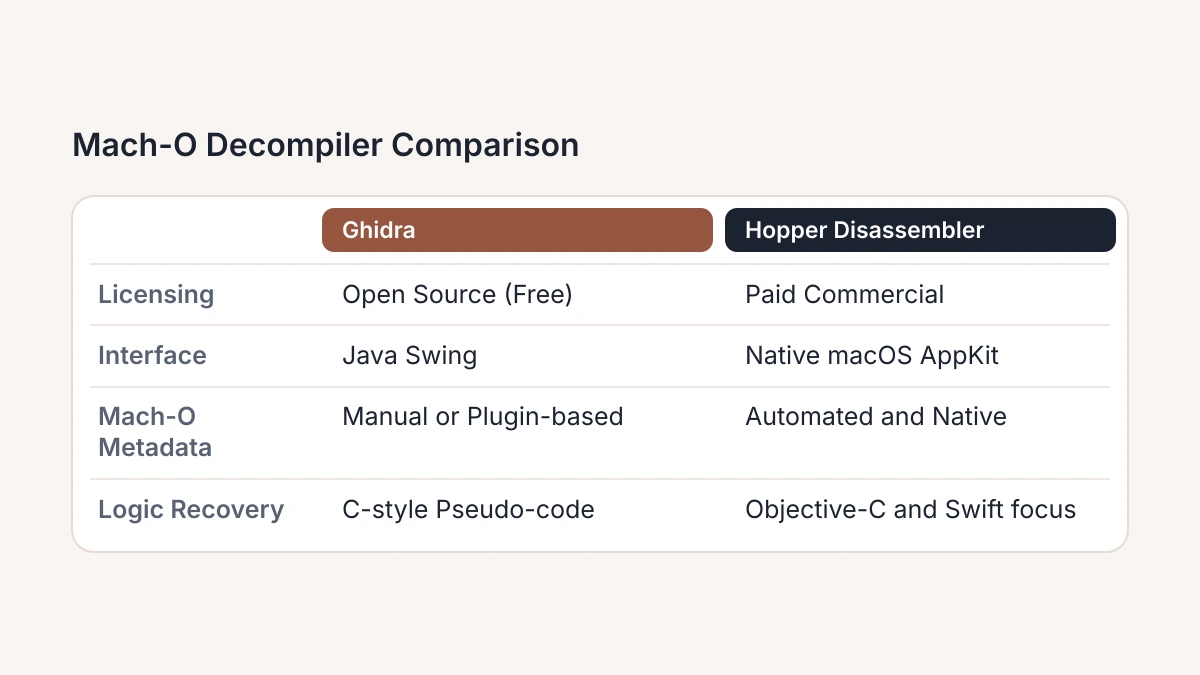
The duration of this analysis varies by the size of the binary and the complexity of its symbol table. Users must wait until the progress bar in the interface disappears before attempting to navigate the code. Rushing into the disassembly before the tool has finished identifying entry points can result in fragmented logic and missing references. The following table summarizes the primary differences between the leading static analysis environments available for macOS.
| Feature | Ghidra | Hopper Disassembler | SkillGild Reconstruction Labs |
|---|---|---|---|
| Licensing | Open Source (Free) | Paid Commercial (Confirm on vendor page) | Subscription (Confirm on vendor page) |
| Interface | Java Swing | Native macOS AppKit | Web and Agent-based |
| Mach-O Metadata | Manual or Plugin-based | Automated and Native | AI-assisted Discovery |
| Logic Recovery | C-style Pseudo-code | Objective-C and Swift focus | High-level Logic Synthesis |
#Step 3: Reconstruct logic with AI-powered agent skills
Deploy Reconstruction Labs through the Model Context Protocol (MCP) to resolve the "word soup" of generic variables and pointer arithmetic often found in stripped Mach-O binaries. This configuration enables an AI agent to interface with your disassembler output directly. By treating assembly instructions as data for contextual analysis, the agent provides more than a simple translation. This method is necessary for modern macOS binaries that use Swift name mangling or aggressive compiler optimization.
Connect your local analysis tool to an MCP-compliant agent to begin the integration. Provide the agent with the control flow graph of a specific function to trigger a logic reconstruction. The agent identifies patterns matching known algorithms or system API calls. This replaces the manual process of tracing registers like rax or rdi through multiple blocks. This automation manages pattern recognition so you can focus on high-level security implications and the functional behavior of the binary.
Use specialized skills designed for code synthesis and structural analysis to bridge the gap between raw assembly and original intent. Standard large language models often lack this specific focus. To refine these workflows, explore implementations like Vercel: Claude Skills and Agent Skills to see how modular tools improve agent performance. These agent skills are the industry standard for deciphering obfuscated Mach-O files. They cross-reference instruction sequences against extensive libraries of compiled patterns to predict source logic.
To execute this reconstruction, isolate a function in your decompiler and pipe the pseudocode to the agent. The agent returns a version of the logic that suggests probable function names and variable types based on macOS system framework interactions. This process converts a block of subtraction and move instructions into a clear narrative of program intent. Check the current pricing and plan details for Reconstruction Labs on the vendor's official page to confirm your tier supports the token volume required for large binary analysis, as these details change frequently.
#Step 4: Analyze symbols and strings to map functionality
The nm utility provides an immediate map of the symbol table within a Mach-O binary. By executing nm -gU [filename], an analyst filters the output to display only globally visible, defined symbols, which often reveals the primary logic entry points and exported functions. In unstripped binaries, these symbols correspond directly to the original source code function names, allowing for a quick assessment of whether the binary interacts with specific macOS frameworks like Security.framework or CoreFoundation. If the output is sparse, the binary has likely been stripped of its symbol table to hinder analysis, a common practice in production software and malicious payloads alike.
The strings command complements symbol analysis by extracting sequences of printable characters from the binary data. Running strings -a scans all sections of the Mach-O file, uncovering embedded URLs, file paths, hardcoded encryption keys, or suspicious shell commands. However, the effectiveness of this technique has shifted as threats evolve. As noted in macOS Reverse Engineering 101, published by Claudia Preciado on August 5, 2025, modern macOS malware frequently employs sophisticated obfuscation to hide these indicators. Analysts must now look past cleartext strings, as sensitive data is often decrypted only at runtime to evade simple static scans.
When static analysis reveals encrypted blocks or high entropy in data sections, the manual effort required to map functionality increases significantly. Professionals who need to automate the identification of these patterns or integrate advanced decryption routines into their workflow can Run Hosted AI Agent Skills to enhance their local toolkit. Relying solely on nm and strings is a baseline requirement, but, these tools serve primarily to identify what has been hidden rather than providing a complete picture of the binary's intent. Success at this stage requires distinguishing between standard system calls and the custom, obfuscated logic that characterizes modern macOS threats.
#Avoid the common pitfalls of macOS reverse engineering
Re-sign your binaries to prevent the kernel from killing modified processes. Current 2026 macOS versions enforce strict integrity checks that invalidate a signature whenever you alter a Mach-O binary. To test modified code, apply an ad-hoc signature using codesign -s - --force <binary> or operate on a machine with System Integrity Protection (SIP) disabled. You must also account for entitlements, which are the specific permissions granted to the original binary. Failing to include these results in runtime crashes even if the signature is technically valid. Professionals who require a deeper understanding of how system architecture influences software construction often study Design engineering to better anticipate these hardware-software handshakes.

Use tools that parse __objc_selrefs and __objc_classrefs segments to overcome the limitations of Objective-C’s dynamic dispatch. Because the runtime resolves method calls at execution via objc_msgSend, a standard disassembler often shows a series of calls to the dispatcher rather than the target logic. You can also employ LLDB to intercept messages at runtime. Mapping these dynamic selectors back to implementation addresses is necessary to transform disconnected fragments into a coherent functional map. Relying on a flat call graph instead of resolving these references leads to incorrect assumptions about program flow.
#Frequently asked questions
#How do I extract a specific architecture from a Mach-O universal binary?
Use the lipo command-line utility with the -thin flag followed by the target architecture and the -output path. This process isolates a single slice, such as arm64 or x86_64, from a multi-architecture "fat" binary. Once extracted, the resulting file is a single-architecture Mach-O that standard decompilers can parse without encountering header conflicts or metadata ambiguity.
#Can I decompile a Mach-O file that has been stripped of symbols?
You can decompile a stripped Mach-O binary, although the decompiler will replace original function and variable names with generic placeholders like sub_100001234. To regain context, you must perform manual pattern matching or use signature-based analysis to identify standard library calls. Modern AI-assisted tools significantly improve this workflow by inferring logic and naming conventions based on the remaining control flow structure.
#What is the difference between Mach-O and ELF files in reverse engineering?
Mach-O files utilize a specific header structure and load commands to define memory segments, whereas ELF (Executable and Linkable Format) uses a global header followed by program and section header tables. While both formats organize code and data for execution, Mach-O is exclusive to Apple operating systems. Reverse engineers must use platform-specific loaders to handle Mach-O’s unique handling of dynamic linking and code signing.
#Is it legal to decompile a Mach-O binary for security research?
Legal permissions for decompilation usually depend on your jurisdiction and the specific purpose of your research, such as identifying vulnerabilities or ensuring interoperability. In the United States, the Digital Millennium Copyright Act (DMCA) provides specific exemptions for security testing and reverse engineering under certain conditions. Always review your local laws and the software's End User License Agreement before proceeding with deep binary analysis.
#Choosing Your Decompilation Strategy
- Assess legal constraints. Check your end-user license agreement and local laws to ensure they permit static analysis for interoperability, security auditing, or private vulnerability research.
- Evaluate output requirements. Decide if you need high-level, human-readable C pseudocode to interpret business logic, or if your team has the expertise to analyze raw assembly instructions directly.
- Verify architecture support. Confirm that your decompiler and disassembler toolchain supports the ARM64 extensions and pointer authentication codes used macOS Mach-O universal binaries.
- Audit resource availability. Calculate the man-hours your team can spend on manual symbol mapping and function reconstruction versus the time required to deploy automated AI-assisted analysis agents.
- Define success metrics. Establish whether your project requires a full, line-by-line restoration of the entire application logic or just the identification of specific vulnerable paths, hardcoded strings, and cryptographic primitives.
Practice reverse engineering consistently. Start with simple command-line utilities before you attempt to deconstruct complex, hardened system frameworks. Skillgild provides the agentic environment required to master these workflows. Begin your training at https://skillgild.dev/.