How to Use the Zomato MCP Server to Automate Food Orders
Learn how the Zomato MCP server enables AI agents like Claude to find meals and place orders, plus how to troubleshoot connection issues in 2026.

Deciding to move food procurement from a manual smartphone app to an automated AI agent requires a shift in how you interact with delivery APIs. The Zomato MCP server functions as the essential bridge for this transition, allowing Large Language Models (LLMs) to browse live menus and place orders through the Model Context Protocol. By exposing Zomato’s API to agents such as Claude, you enable a workflow where an AI can interpret natural language requests and execute them directly against real-time restaurant data.
This guide settles the technical requirements for establishing this link and provides the troubleshooting steps necessary to maintain it. You will learn to configure the local manifest to avoid the common errors that cause agent disconnection and how to validate API keys to ensure the connection remains active. Beyond basic setup, this piece clarifies how to apply natural language filtering for specific constraints, such as meal searches under 300 rupees, and when to transition from local MCP servers to hosted solutions like SkillGild to reduce the maintenance burden of local infrastructure.
Key takeaways
- The Zomato MCP server allows AI agents to query restaurant data and process orders directly through the Model Context Protocol.
- Users can filter for specific constraints, such as finding meals under 300 rupees, using natural language prompts.
- Connection failures in VS Code or Cursor are typically resolved by checking the server manifest configuration.
- SkillGild provides hosted alternatives to local MCP setups to reduce the friction of maintaining scraper servers.
Try it on a real task: Academic Plotting is free for 25 runs a month.
#Table of contents
- The Zomato MCP server connects AI agents to live food data
- Automation enables complex queries like sub-300 rupee meal searches
- Nugget and internal AI infrastructure handle the heavy lifting
- Scraper servers provide data when official APIs are restricted
- Configuration errors in VS Code often stem from manifest issues
- SkillGild removes the maintenance burden of local MCP servers
- Frequently asked questions
- Choose Between Local Maintenance and Managed Automation
#The Zomato MCP server connects AI agents to live food data
Use the Zomato MCP server to integrate Large Language Models (LLMs) with real-time food delivery infrastructure via the Model Context Protocol. By implementing this server, you enable an AI agent to browse restaurant menus, compare prices, and initiate orders directly from a chat interface. This protocol standardizes how an AI queries external databases. It moves beyond static training data to interact with live inventory and pricing.

Expose Zomato’s API endpoints to agents such as Claude to make the system functional. This allows the model to interpret user intent, such as a request for a specific cuisine or dietary requirement, and translate it into structured API calls. Professionals seeking to understand the technical distinction between basic model capabilities and these specialized tool integrations should review the differences between Claude Skills vs Agents, Commands & Plugins. This type of integration follows a development path established in late 2025, when Zomato began using ChatGPT and Claude to facilitate conversational food ordering.
Set up the local environment correctly to ensure successful automation. The connection fails if the local manifest file, which defines how the host application interacts with the MCP server, is misconfigured. You must also obtain a valid Zomato API key to authenticate requests. Without a functional key, the agent cannot retrieve live data or execute transactions. Verify current API pricing and access tiers on the vendor's developer portal, as these terms are subject to change.
#Automation enables complex queries like sub-300 rupee meal searches
Input conversational prompts such as "find me a cheap lunch" or "I want something to eat for less than 300 rupees" to trigger the server's filtering logic. The Zomato Model Context Protocol (MCP) server acts as a translator between the Large Language Model (LLM) and the Zomato backend. Instead of requiring you to manually toggle filters for price range and rating within a graphical interface, the server interprets the intent behind the natural language. It parses the text to identify specific constraints, such as a price ceiling, and maps these descriptors to the corresponding database fields.
The transformation from a string of text to an actionable command happens through a schema-matching process. When an agent receives a query for a meal under 300 rupees, it identifies the price-related parameters within the Zomato API toolset. The server then constructs a structured request that specifies the maximum budget allowed for the search results. For professionals looking to customize these interactions or integrate them into broader workflows, the AI Agent Skills API, CLI & MCP Reference provides the technical documentation necessary to refine how these parameters are passed between systems.
Budget-specific automation is a primary use case for this integration. By programmatically finding food under 300 rupees, the MCP server eliminates the need for manual browsing to check individual item prices. The server filters results at the API level, ensuring that the AI agent only presents options that strictly adhere to the user's financial threshold. You should verify current menu pricing, taxes, and delivery fees on the Zomato platform, as these figures are subject to change based on restaurant updates or real-time demand.
This automated filtering relies on interoperability standards maintained throughout 2026. The infrastructure supporting these AI-driven search interactions is often hosted on platforms where the Google LLC copyright for 2026 reflects the current service terms and compliance frameworks. By using these stable protocols, the Zomato MCP server maintains high accuracy in translating conversational descriptors like "affordable" into the specific numerical values required for a successful API response. This ensures that the automation remains functional even as the underlying language models undergo frequent updates.
#Nugget and internal AI infrastructure handle the heavy lifting
Deploy the Zomato MCP server to connect your workflows to the same infrastructure that manages Zomato's large-scale operations. This system relies on Nugget, a proprietary AI platform that handles millions of interactions monthly to process queries and coordinate logistics. Integration provides your automated tasks with the same operational stability used for Zomato’s customer-facing services.
Use the MCP server as a standardized link between Large Language Models (LLMs) and Zomato's internal databases. This setup supports a transition from manual ordering to agentic commerce. The server supplies the data an AI needs to browse menus, verify availability, and complete orders without human intervention through a mobile app. This architecture is built for high-volume automation rather than experimental use.
Rely on the technical longevity of these tools, which is backed by institutional research. Deepinder Goyal's personal commitment to Continue includes a $25 million investment in scientific research regarding human ageing and longevity. Although this research is separate from logistics, it demonstrates a commitment to long-term technological development. This ensures the AI tools remain maintained as the industry evolves.
Treat the MCP server as the primary interface for your autonomous agents. To succeed, you must ensure your agents can interpret the structured data from the Zomato backend. If you need a technical breakdown of agent functions in a professional setting, consult Orchestra Research: Claude Skills to find a framework for scaling. This ensures food ordering becomes a predictable part of a broader AI workflow.
#Scraper servers provide data when official APIs are restricted
Integrating Zomato into an automated workflow requires a clear choice between the official Model Context Protocol (MCP) implementation and community-built alternatives. While the official server facilitates direct actions like placing orders or checking delivery status, community tools such as the Apify Zomato Scraper MCP server serve a different purpose. These scrapers bypass the limitations of a restricted API by extracting public-facing information directly from the web interface. Developers typically use these tools to gather large-scale information on restaurant pricing, menu variations, and user sentiment across different geographic regions, rather than for individual food transactions.
Current usage metrics reflect the niche but specific utility of these third-party tools. The Zomato Scraper on Apify currently holds a rating of 4.1 stars based on two reviews. It has been bookmarked three times and has reached a total of 431 users since its release. However, engagement remains low for real-time applications, with only two monthly active users recorded in late 2026. This indicates that while many professionals test the scraper for initial data harvesting projects or one-off market reports, it is less frequently used for the high-frequency, daily transactional tasks that characterize the official Zomato MCP server.
Choosing the right tool depends on whether the objective is transaction or aggregation. If the goal is market research or competitive analysis, scrapers provide the breadth of data that an official API might throttle or hide behind enterprise-tier paywalls. For a deeper look at available tools in this category, professionals can review the Best MCP Servers for Web Scraping in 2026 to identify which servers offer the highest reliability for unstructured data retrieval. Users should verify current pricing and subscription tiers on the Apify platform, as these costs fluctuate based on compute usage and proxy requirements.
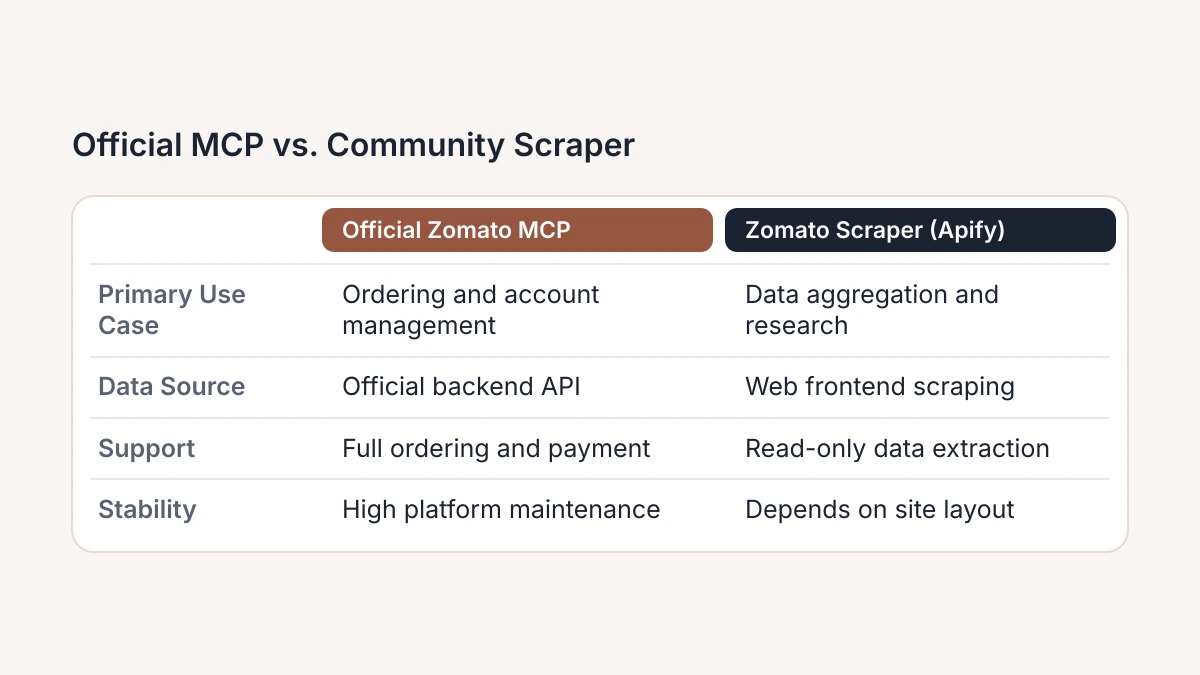
Maintenance frequency is a critical factor for reliability, as scraper servers must frequently update their code to handle changes in Zomato’s web layout. The Apify community version was last modified a month ago, suggesting a relatively recent update to its extraction logic. Unlike the official server, which interacts with stable backend endpoints, these community tools are subject to breaks whenever the site architecture shifts. The following table highlights the primary differences in functionality between these two distinct approaches to Zomato integration.
| Feature | Official Zomato MCP | Zomato Scraper (Apify) |
|---|---|---|
| Primary Use Case | Food ordering and account management | Data aggregation and market research |
| Data Source | Official Zomato backend API | Web frontend scraping |
| Transactional Support | Full ordering and payment capabilities | None; read-only data extraction |
| Stability | High; maintained by platform | Moderate; depends on site layout |
| User Sentiment | Platform-supported reliability | 4.1 rating based on two reviews |
#Configuration errors in VS Code often stem from manifest issues
Connection failures frequently occur during the initial setup of the Zomato MCP server within VS Code environments. Users often encounter a persistent "Unable to connect" error, a documented technical hurdle identified as Issue #63 regarding Zomato MCP connection failures. This problem typically arises when the IDE fails to locate the server manifest or cannot establish a stable handshake with the Model Context Protocol (MCP) host. As developers increasingly automate food logistics via these tools, ensuring the manifest configuration aligns perfectly with the local environment remains the primary requirement for a functional deployment.
A common source of these failures is an incorrect absolute path within the mcp-servers configuration file. If the VS Code extension cannot find the executable or the script defined in the manifest, the server will fail to initialize, often without providing a descriptive error message in the primary console. To resolve this, verify that the command and args fields in the JSON configuration point to the exact directory of the Zomato MCP installation. Environment variables must also be explicitly defined if the server relies on specific API keys or local binaries that are not globally scoped in the system path.
When the path is verified as correct but the connection still drops, the failure likely stems from a server-side timeout. These interruptions occur when the Zomato API gateway or the local MCP proxy takes too long to respond to the initial health check. Unlike path errors, which prevent the server process from starting entirely, timeouts usually manifest as a "hanging" state followed by an abrupt disconnection. This behavior is often triggered by network latency or rate-limiting on the Zomato developer portal, rather than a flaw in the VS Code internal settings.
To determine the root cause of a failure, use this diagnostic checklist. First, check the VS Code Output panel for "spawn" errors; the presence of these errors indicates a local environment path error. Second, attempt to run the server directly from a terminal outside of the IDE; if it initializes successfully, the issue is restricted to the IDE manifest configuration. Third, monitor the response time of the Zomato API; if the server starts but fails during a data query, the issue is a server-side timeout. Finally, confirm that the Zomato MCP server version is compatible with the current IDE build to prevent protocol mismatches.
#SkillGild removes the maintenance burden of local MCP servers
Host your Zomato MCP server on SkillGild to avoid the constant attention required by JSON manifests and scraper uptime. Local configurations often break when web structures or API endpoints change, forcing you to manually restore functionality. Instead of draining resources on maintenance, use SkillGild to host the infrastructure for your food-ordering automation agent. By shifting server management to the cloud, you ensure the Zomato integration stays active and accessible. This removes the need to manage local runtimes or debug environment-specific errors.

The platform uses a standardized SKILL.md format to bridge the gap between the agent and the hosted tool. You do not need to write extensive boilerplate code for data parsing or connection protocols. Simply provide your agent with the SKILL.md definition. This file acts as a detailed map that shows the agent exactly how to query restaurant data or start order sequences. SkillGild manages the execution layer, so your agent interacts with a stable interface instead of a fragile local script. This standardization speeds up deployment, allowing you to integrate Zomato MCP capabilities into your workflow much faster than a manual setup.
Connect your agent to the SkillGild platform to access these hosted capabilities. The platform acts as the intermediary for all Zomato-related requests. It handles authentication, proxy management, and rate-limiting, which are the main complexities of food delivery scrapers. This setup lets your agent focus on high-level logic, such as comparing menu prices or scheduling deliveries, while the hosted server manages the data retrieval. To expand your automation stack, review the Best MCP Servers for Claude Code (2026). This guide provides a roadmap for integrating multiple hosted tools into one agent environment.
Adopt a hosted model to future-proof your automation projects. Technical documentation from Google LLC indicates that the industry is moving toward managed infrastructure for AI tools to improve reliability and security. You can see how to apply these cloud-based configurations in detailed video tutorials on YouTube, which show how to transition from local manifests to hosted skills. By using SkillGild, you avoid the "breaking change" cycle common in web-dependent tools. The platform maintainers handle the updates required to keep the tool working as the source site changes.
#Frequently asked questions
#How do I fix Zomato MCP connection issues in VS Code?
Verify your mcpServers configuration in the settings.json file to ensure the executable path is absolute and correctly formatted. Most connection failures result from syntax errors in the JSON manifest or missing environment variables required by the server. If the server fails to initialize, restart the VS Code extension host to force a refresh of the Model Context Protocol registry.
#Can I order food under 300 rupees using Claude?
You can automate meal searches for under 300 rupees by prompting Claude to filter results based on the "price_for_two" or specific dish price attributes. The MCP server parses these constraints to return restaurant listings that meet your exact budget. This allows for complex, multi-variable queries that the standard Zomato mobile interface cannot execute in a single step.
#What is the difference between the official Zomato MCP and the Apify scraper?
The official Zomato MCP relies on structured API endpoints, while the Apify scraper extracts data directly from the web interface to bypass API rate limits or restrictions. Using a scraper is often necessary when official access is unavailable or when you need real-time data not exposed through standard developer channels. Scrapers are more resilient to API versioning changes but require more compute resources.
#Is the Zomato MCP server compatible with Cursor and Claude Code?
The Zomato MCP server is fully compatible with Cursor and Claude Code, as both platforms support the open Model Context Protocol standard. To integrate it, add the server's configuration to the respective tool's MCP settings file. This enables these AI-native editors to fetch live restaurant data and execute food-related scripts directly within your development environment.
#Choose Between Local Maintenance and Managed Automation
- Audit technical bandwidth, determining if your engineering team currently has the capacity to manually troubleshoot recurring manifest errors and configuration conflicts within VS Code.
- Verify data frequency, checking if your specific food automation workflows require the high-velocity updates provided by scraper servers to navigate official API restrictions.
- Assess infrastructure security, confirming if local nugget configurations and internal AI frameworks meet your organization's evolving data privacy and compliance standards.
- Calculate maintenance costs, estimating the cumulative weekly hours your staff will spend patching workarounds for official Zomato APIs that frequently limit direct data access.
- Confirm scaling needs, deciding if your immediate goal is to deploy a single experimental agent or a coordinated fleet of agents across the entire enterprise.
Professional developers often find that the time spent managing local environment variables outweighs the benefits of a self-hosted setup. If you prefer building high-level automation logic over fixing broken server connections, visit SkillGild to deploy your Zomato MCP server without the infrastructure overhead. SkillGild removes the maintenance burden of local MCP servers by providing a reliable, managed environment for your AI agents.