Claude Code vs Cursor: Choosing Your AI Coding Interface
A deep-dive comparison between Claude Code and Cursor. Choose between CLI-driven automation and IDE-integrated development for your 2026 workflows.

Select your AI-assisted engineering tool by choosing between two distinct mental models. As of late 2026, the performance gap between these tools no longer stems from the underlying intelligence. Both use Claude 3.5 and 3.7. The difference lies in the interface through which they access your codebase. This choice defines whether your development cycle centers on a terminal-driven agent capable of autonomous loops or a visual, IDE-integrated co-pilot that prioritizes real-time editing precision.
Use this comparison to settle which interface aligns with your specific workflow requirements and context management needs. Determine whether your projects benefit more from the persistent 200k-token context window of a CLI-first agent or the visual gutter-integrated experience of a dedicated IDE. Furthermore, this guide identifies how to extend the base capabilities of both tools using the Model Context Protocol (MCP) and specialized services like SkillGild to handle tasks that standard models cannot yet execute, such as binary reverse engineering or automated brand guideline enforcement. Use this framework to select a tool based on your proximity to the terminal and the scale of your multi-repo environment.
Key takeaways
- Choose Claude Code for terminal-heavy workflows where scriptable automation and deep CLI integration are the priority.
- Opt for Cursor if you require a visual, IDE-native experience that mirrors VS Code while providing real-time code suggestions.
- Use SkillGild's MCP-compatible skills to bridge the gap between both tools, adding specialized capabilities like binary reverse engineering or SVG generation.
- Consider Claude Code for larger context tasks where maintaining a stable 200k-token window across sessions is critical.
Try it on a real task: Academic Plotting is free for 25 runs a month.
#Table of contents
- The interface dictates the developer's mental model
- Context management favors the CLI for long-running sessions
- Automation and scripting vs. visual precision
- Extend both tools with MCP-compatible specialized skills
- Multi-repo indexing and the scale of the codebase
- Verdict: Choose based on your proximity to the terminal
- Frequently asked questions
- Commit to Your Primary Development Environment
#The interface dictates the developer's mental model
The functional distinction between these tools rests not on the intelligence of the underlying large language model, but on the environment through which a developer interacts with that model. Both Cursor and Claude Code run on Claude 3.5 and 3.7 to generate, refactor, and debug code. The decision to use one over the other depends entirely on whether the task requires a visual, editor-centric approach or a terminal-based, agentic workflow.

Cursor operates as a full-featured Integrated Development Environment (IDE) based on the VS Code framework. Its mental model is built around the file tree and the text buffer. Developers interact with the AI via sidebars, inline chat windows, and visual diffs that highlight changes line-by-line. This interface suits users who prefer to maintain visual oversight of their codebase, manually navigating between files while the AI suggests completions or small-scale refactors within the active window.
Claude Code shifts the interaction to the command line, functioning as a terminal-resident agent. Instead of waiting for a developer to open a specific file, the agent executes shell commands, searches directories, and runs tests autonomously. This interface prioritizes speed and systemic changes over visual confirmation. Developers who need to automate complex sequences, such as updating a library across multiple microservices or debugging a build failure, should Browse Claude Code Skills and Agent Skills to understand how these autonomous capabilities differ from standard IDE extensions.
Choosing between these tools requires matching the interface to the developer's current cognitive load. Cursor is the tool for surgical, highly specific edits where the developer wants to remain "in the code" and review every character change as it happens. Claude Code is the choice for high-level orchestration where the developer wants to delegate a multi-step objective to an agent that can interact directly with the file system and the execution environment. The two tools are not mutually exclusive but represent different modes of operation for the modern software engineer.
#Context management favors the CLI for long-running sessions
Match your tool choice to the architectural depth of the task. Use Claude Code for complex logic because its 200k-token context window stays persistent across CLI sessions. While Cursor’s Max Mode provides up to 200k tokens, the usable range often fluctuates between 70k and 120k tokens. Choose the CLI for more predictable performance when the model must reference code blocks from the start of a long refactoring session.
Manage context actively when handling large-scale enterprise projects. Even though Qodo's Context Engine supports multi-repo indexing for 10 or 1,000 repos, the interface determines how much data the AI retains. Use Claude Code’s terminal-based approach to reduce the risk of context flushing during high-memory operations. This allows the model to keep a detailed and interconnected map of the codebase structure during hours of continuous interaction. IDE-integrated tools often reset context more frequently to maintain editor performance.
Evaluate how memory limits impact the visual and structural integrity of your application. If a model loses track of earlier decisions because the context window is unstable, it will likely introduce regressions or inconsistent styling. Review Claude Code Frontend Design Skills Compared to see how these technical limits specifically affect UI development. You must ensure your AI tool can hold a large, multi-file context without degradation for any production environment work.
Use Claude Code for extensive structural changes and Cursor for rapid, iterative feature work where you rarely exhaust the 200k window. Check current plan details on official vendor pages before you commit to a workflow, as token limits and performance tiers change frequently. Select the CLI to give the model the largest possible active memory for the whole session. This prevents the AI from losing track of critical project constraints during a complex build.
#Automation and scripting vs. visual precision
Select the interface based on whether the task requires visual oversight or autonomous execution. Cursor functions as a sophisticated IDE extension, integrating AI directly into the text editor's gutter and sidebar. This setup prioritizes interactive assistance where the developer monitors every character change as it happens. In contrast, Claude Code operates as a command-line interface (CLI) agent. It does not wait for the developer to approve every line during the generation process. Instead, it works through a task, executes the necessary terminal commands, and presents a completed result or a request for further instruction.
Use Claude Code for agentic workflows that involve repetitive debugging and verification cycles. Because the tool has direct access to the shell, it can run a test suite, interpret the stack trace, and modify the source code to resolve the failure without manual intervention. It excels at broad architectural changes across multiple files where the developer prefers to define a goal, such as migrating a directory to a new API schema, and let the agent handle the file I/O and verification. For developers aiming to automate complex multi-step workflows, the Claude Code Skills Marketplace: Install Skills offers a way to deepen these autonomous capabilities.
Opt for Cursor when the primary requirement is visual precision and immediate feedback. Cursor’s "Composer" mode allows for multi-file edits, but it presents these changes as diffs within the editor interface. This allows a professional to review the logic, style, and syntax of the AI's suggestions before they are committed to the codebase. It is the superior choice for front-end development or logic-heavy sections where the developer must ensure the AI follows specific internal patterns that are easier to see than to describe in a prompt. The interface keeps the developer in the center of the loop, making it easier to catch subtle regressions during the authoring phase.
The decision often comes down to the friction of the feedback loop. Claude Code reduces friction for background tasks, such as dependency updates or boilerplate generation, by removing the need for a graphical user interface. It treats the codebase as a system to be managed. Cursor treats the codebase as a document to be authored. If the goal is to outsource the labor of running tests and debugging loops, the CLI agent is the more efficient tool. If the goal is to enhance the speed of manual coding while retaining total control over the visual state of the editor, the IDE-based assistant remains the industry standard. Confirm current pricing and plan features on the respective vendor websites, as these service tiers are subject to change.
#Extend both tools with MCP-compatible specialized skills
Base LLMs often lack the domain-specific logic required for niche engineering tasks. While Claude Code and Cursor are powerful generalists, they rely on the Model Context Protocol (MCP) to bridge the gap between text generation and specialized execution. MCP acts as an open standard that allows these interfaces to connect with external tools and data sources, effectively giving the AI agent the ability to perform actions outside the standard file-editing loop. By using this protocol, developers can supplement the model's reasoning with external computational power or proprietary data sets.

SkillGild facilitates this expansion by hosting specialized skills that users can plug directly into their chosen interface. Instead of writing custom scripts to handle complex logic, developers use SkillGild to call pre-configured agents designed for high-stakes technical work. Those looking to deepen their understanding of these integrations can review the documentation at Anthropic: Claude Skills and Agent Skills to see how these capabilities extend the base model's reach. This hosted approach ensures that the "missing layer" of expertise is always available without the overhead of local tool maintenance.
This infrastructure solves specific bottlenecks where general-purpose models typically fail. For instance, a developer can use a SkillGild MCP skill to reverse engineer binaries, a task requiring precise assembly knowledge that standard LLM training data often struggles to apply accurately. Similarly, a design-focused team can invoke a skill to generate or validate brand guidelines. This ensures that any UI code produced by Cursor or Claude Code adheres to strict organizational standards and design tokens without requiring a manual audit by a human designer at every step.
The choice between Claude Code and Cursor is less about the underlying model and more about the extensibility of the environment. Both platforms support MCP, meaning a team's investment in specialized skills remains portable regardless of whether they prefer a CLI or an IDE. By connecting these tools to a hosted skill provider, professionals move beyond simple autocomplete into a workflow where the AI manages complex, multi-step domain tasks autonomously. This setup allows the developer to focus on high-level architecture while the specialized skills handle the granular execution of technical requirements.
#Multi-repo indexing and the scale of the codebase
Cursor provides a native indexing system that creates local embeddings of the codebase to facilitate deep context retrieval. To get the most out of this feature, ensure that the indexing process completes fully before you attempt complex refactors or cross-file queries. This built-in tool allows the model to pull relevant code snippets from across the project without you needing to manually identify every dependency. The system handles standard projects reliably, though performance depends on local hardware resources and the total number of files being indexed.
Claude Code operates as a terminal-based agent, which changes the workflow for large-scale projects. Instead of maintaining a persistent background index in the way a full IDE does, it relies on active file system exploration and targeted context gathering during a session. This approach remains highly efficient for developers who have a clear starting point within a directory. However, for those navigating a massive and unfamiliar codebase, the agent must spend more time and tokens searching the directory structure to build its own temporary map of the logic.
Enterprise teams face a specific challenge when their architecture is distributed across hundreds of microservices. While Cursor excels at single-repo depth, it can encounter limitations when the necessary logic resides in a separate, unlinked repository. This fragmentation often leads to integration errors if the AI cannot "see" the source code of a dependency living elsewhere. Choosing between these tools requires an assessment of how often a developer needs to reference code outside their current working directory to complete a single task.
High-scale environments should consider augmenting these interfaces with specialized context layers to bridge the gap between repositories. For instance, Qodo’s Context Engine supports multi-repo indexing for 10 repos or 1,000, providing a centralized knowledge base that standard IDE indexing often lacks. This setup allows the AI to draw from the entire corporate library, significantly reducing the time spent explaining external dependencies to the model. Before committing to a specific enterprise plan, confirm current repository limits and integration capabilities on the vendor’s official site.
#Verdict: Choose based on your proximity to the terminal
Select Claude Code if the command line is the primary environment for development, testing, and deployment. This interface suits developers who prefer a high-agency tool capable of executing complex sequences. It can run a test suite, identify a failure, and apply a fix without leaving the terminal. It functions less like a text editor and more like a specialized collaborator that operates directly on the file system. This agentic approach remains the standard for those who want to issue broad instructions like "fix all linting errors in this directory" and watch the tool navigate the project structure autonomously.
Choose Cursor if the goal is a frictionless transition from a traditional IDE to an AI-native workspace. Because Cursor is a fork of VS Code, it retains full compatibility with existing extensions and themes while embedding large language model capabilities into the editor’s UI elements. It is the better option for developers who rely on visual cues, such as AI-powered code suggestions appearing in the gutters or a persistent chat sidebar for refactoring specific blocks of highlighted text. It prioritizes the "edit-as-you-go" flow over the "delegate-and-review" flow of a CLI-based agent.
The decision hinges on how much control the developer wishes to cede to the interface. Claude Code excels at broad, multi-step tasks that involve shell execution and environment interaction. Developers who intend to build custom automations or extend the tool’s reach into their specific tech stack should explore the Agent Skills SDK: Run Claude Skills from Code to understand how these agentic capabilities are structured. Conversely, Cursor is optimized for the granular, line-by-line composition of code where the developer remains the primary driver within a visual interface.
Both tools offer tiered access, typically ranging from free individual tiers to paid professional subscriptions that provide higher rate limits for advanced models. Users must verify the specific features and costs on the official Anthropic and Cursor websites, as pricing structures and model availability are subject to frequent updates. For a professional workflow, the choice is clear. Prioritize Claude Code for terminal-centric automation and Cursor for a visual editing experience where AI features are built directly into the workspace.
#Frequently asked questions
#Is Claude code better than Cursor for coding?
Claude Code is superior for terminal-centric workflows, while Cursor is better for developers who prefer a visual IDE. Choose Claude Code if you need to script complex refactors or manage files directly from your command line. Opt for Cursor if you require deep visual integration with your source tree and a traditional editor interface.
#What are the usage limits for Cursor?
Cursor applies usage limits based on your subscription tier, typically restricting the number of "fast" model requests available each month. Once you exceed your specific plan's quota, the system may transition you to slower models or require additional credits. Check your account dashboard to view real-time consumption and available upgrades.
#Does Elon Musk own Cursor AI?
No, Elon Musk does not own Cursor AI. The software is developed by Anysphere, an independent company that has received backing from venture capital firms and OpenAI. It is not affiliated with X.AI, Tesla, or any other entities under Musk's direct control.
#What is a nickname for Claude?
Claude is frequently nicknamed "The Poet" due to its nuanced writing style and adherence to its "Constitutional AI" training framework. Developers also commonly refer to it as "Anthropic," referencing its parent company, when discussing model performance. Recognizing these names helps when navigating community forums for specific prompt engineering tips.
#Commit to Your Primary Development Environment
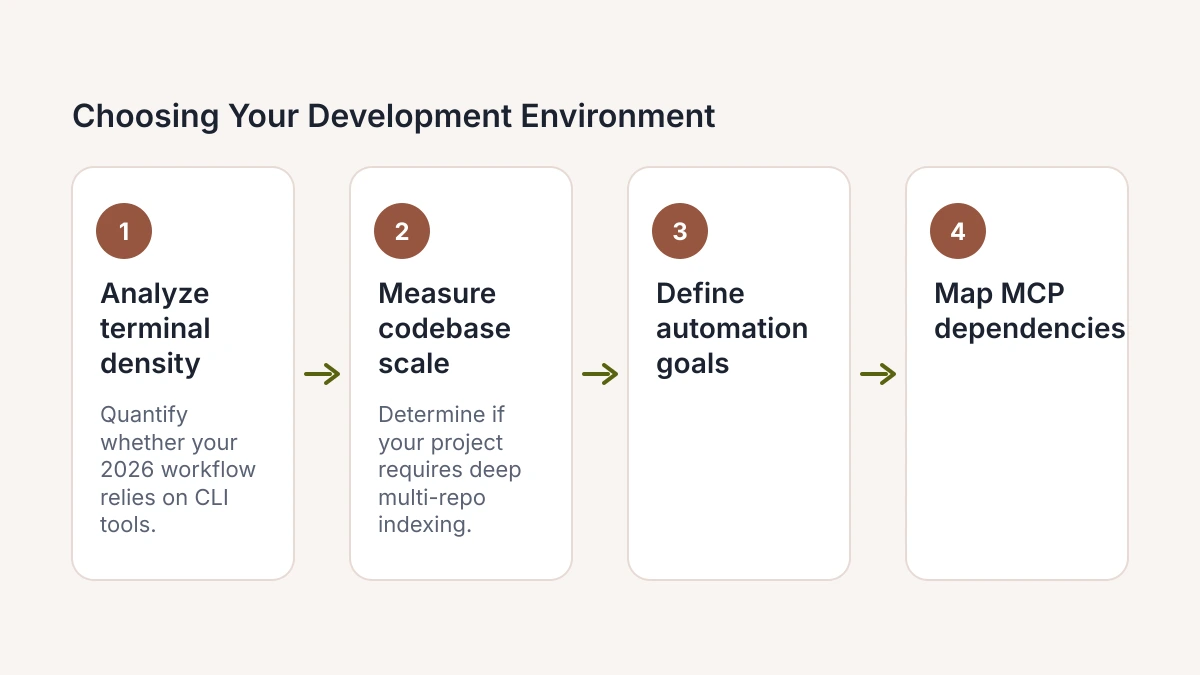
- Analyze terminal density. Quantify whether your 2026 workflow relies primarily on CLI-driven build tools or visual debugging interfaces that require a heavy IDE presence.
- Measure codebase scale. Determine if your current project requires the deep, multi-repo indexing capabilities of a dedicated editor or the targeted, ephemeral file-stream focus of a terminal-based agent.
- Define automation goals. Choose whether you prioritize an AI that autonomously executes shell commands and manages background tasks or one that focuses on real-time code completions and UI-driven refactoring.
- Map MCP dependencies. Identify the specific Model Context Protocol servers you must integrate to bridge your local documentation and proprietary data with your chosen AI interface.
- Trial session persistence. Execute a complex refactoring task in both Claude Code and Cursor to see which interface better preserves your mental model during long-running, multi-step engineering sessions.
Visit Skillgild to master these tools through our hands-on engineering workshops and book your consultation at https://skillgild.dev/. We provide the technical blueprints to help your team integrate AI agents into production environments.