
Turn the project you just built into a short, shareable launch video with one command. Your agent reads the project code, so no live URL or screenshots are needed.
Brag
25 runs/mo
Remotion's official Agent Skills for making videos with React code: remotion-create scaffolds a project, remotion-markup covers animation and layout patterns, remotion-render produces video or stills, plus studio, captions, maps, SaaS architecture, interactivity, docs search and upgrade skills.
skillgild install remotion-skills


License: not stated by the project · Created by Remotion · The project lists support for Claude Code, Codex, Cursor, Kimi Code

A community skill: it installs from its own repository and your agent runs the project's instructions locally with your own model. SkillGild lists it and credits the author; nothing runs on SkillGild.
With the SkillGild CLI (needs git). It clones remotion-dev/skills and copies the skill folder into the right place for your agent; use --agent codex, cursor or gemini-cli for other clients.
skillgild install remotion-skills --agent claude-codeAny agent, with the skills CLI.
npx skills add remotion-dev/skillsManual copy.
Clone the repo and copy the skill folders into ~/.claude/skills/Or copy the folder yourself from remotion-dev/skills into ~/.claude/skills/remotion-skills/ for Claude Code, ~/.agents/skills/ for Codex, ~/.cursor/skills/ for Cursor or ~/.gemini/skills/ for Gemini CLI, then start a new session.
Requests that trigger this skill once it is installed in your agent.
Create a 20-second product teaser video with Remotion
Add animated captions to this composition
Render the intro composition as an MP4
Run skillgild install remotion-skills --agent claude-code: the SkillGild CLI clones remotion-dev/skills and copies the skill folder into ~/.claude/skills/remotion-skills. You can also use the project's own commands shown above, or copy the folder yourself. Use --agent codex, cursor or gemini-cli for other clients.
The remotion-dev/skills repository does not include a license file at the time of listing, so treat it as all rights reserved by the author until one is added. SkillGild lists and links it; it does not host or redistribute the files.
The project lists Claude Code, Codex, Cursor, Kimi Code. It is a plain Agent Skills folder (SKILL.md plus supporting files), so any client that reads that format can load it.
No. Remotion Agent Skills is a community skill: your agent runs its instructions locally with your own model, and SkillGild lists, credits and installs it. Hosted SkillGild skills are marked differently and run through the SkillGild MCP server.
A Remotion project (bun create video offers the skills during setup). Everything else is the usual: a coding agent that loads skills and the folder installed where that agent looks for it.
Setup steps and worked examples for this kind of skill.
Turn the project you just built into a short, shareable launch video with one command. Your agent reads the project code, so no live URL or screenshots are needed.
Create, animate, review and render videos in code with fframes: Rust, SVG scenes and GPU rendering. Covers setup, motion design, sound, a live preview window and automatic checks without watching the render.

Write HTML, render video: build HyperFrames compositions with timed clips, seekable GSAP animation, captions, audio and sub-compositions, ready to render to MP4 with the HyperFrames CLI.

Make a code-rendered lyric music video for a finished song: every sung word lands on its own syllable inside dense animated graphics, with a recurring character, rendered offline at 1080p60. No video model.

Turn your own narration and real assets (book covers, screenshots, logos) plus a chosen visual style into a 20 to 60 second cinematic promo, or turn a script into an animated illustration clip.
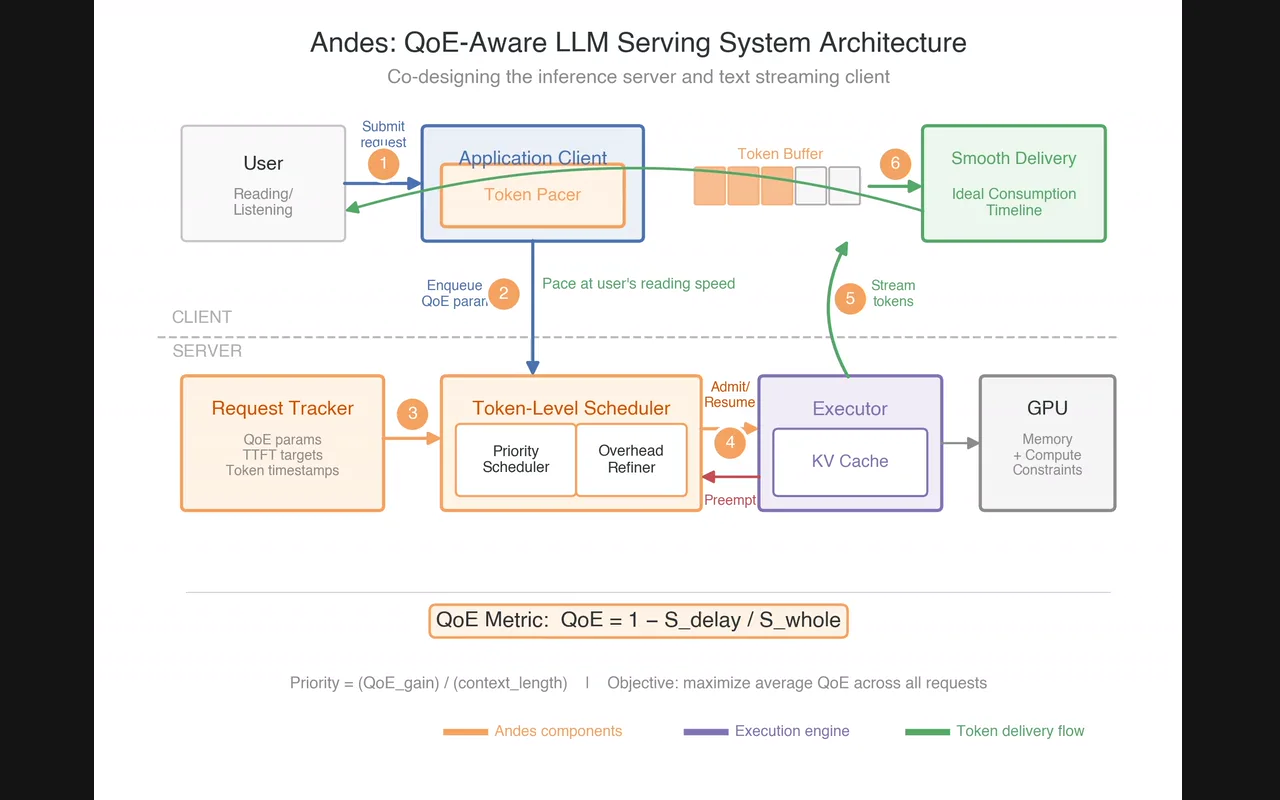
Publication-quality figures for ML papers: picks the chart type for your results, writes the matplotlib or seaborn code and checks its colors for contrast. Use it to compare methods, baselines or ablations in a chart, to check whether text and figure colors meet a contrast ratio, or to plan an architecture diagram from your method section.

Karpathy's observations on how LLMs fail at coding, codified into four rules the agent follows: think before coding (state assumptions, ask instead of guessing), simplicity first, surgical changes, and goal-driven execution.
Builds an animation from scratch the way a design engineer would: it chooses the curve, duration and properties, keeps motion off the main thread where it matters, and explains the choice.

Translates Apple's interface and motion principles into web code: spring curves, gesture physics, translucent materials and typography, as explained in Apple's WWDC design sessions.

Anthropic's canvas-design skill guides Claude to produce finished visual artefacts (posters, covers, social graphics) by composing on an HTML canvas with deliberate typography, grid and colour decisions rather than defaulting to a template.