Humanizer vs Stop Slop: which removes AI writing tells?
Humanizer and Stop Slop both strip AI writing tells, in different ways. What each changes, how they differ, and why many writers run both in sequence.
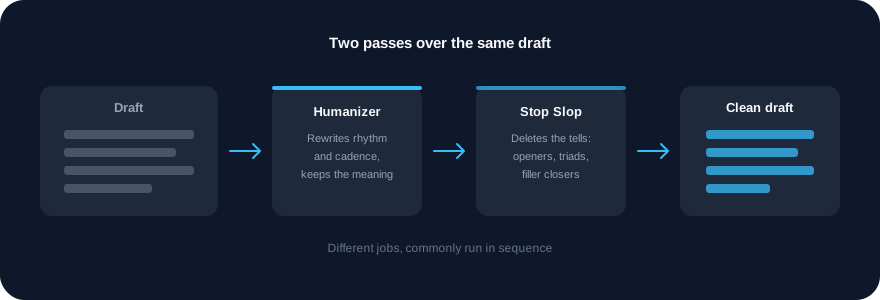
Short answer: they do different jobs, and most people who care about this run both. Humanizer rewrites AI-sounding prose so it reads like a person wrote it, without changing what it says. Stop Slop is a shorter, stricter rule set that deletes the specific tells a model leaves behind. Humanizer changes how a draft moves; Stop Slop removes what should not be there. Running Humanizer first and Stop Slop last is the common order.
Both are free, open-source community skills, listed on SkillGild and installed from their own repositories. Neither is ours.
Try it on a real task: Academic Plotting is free for 25 runs a month.
#What each one actually does
Humanizer by blader rewrites AI-sounding text so it reads like a person wrote it, without changing what it says. It works from the patterns catalogued in Wikipedia's guide to AI writing, then audits its own output against the same list. It is the most-searched community skill of the year, which is a reasonable proxy for how widely the problem is felt.
Stop Slop by Hardik Pandya is a skill file that teaches the model to recognise and remove its own writing tells: throat-clearing openers, not-X-but-Y contrasts, forced triads, filler closers. It is seven rules rather than a rewriting method, which is why it is quick and why it rarely changes your meaning.
The distinction matters because the two failure modes are different. A draft can be free of every obvious tell and still read like a machine wrote it, because the sentences are all the same length and every paragraph has the same shape. That is Humanizer's problem to solve. Equally, a well-paced draft can still open with "In today's fast-paced world" and close with "the possibilities are endless". That is Stop Slop's.
#Side by side
| Humanizer | Stop Slop | |
|---|---|---|
| Author | blader | Hardik Pandya |
| What it changes | Rhythm, sentence variety, cadence | Specific phrases and structures |
| Method | Rewrites, then audits its own output | Seven rules applied to the draft |
| Risk to your meaning | Higher: it rewrites sentences | Lower: it mostly deletes |
| Length of pass | Slower, it reworks the text | Fast |
| Best used | First, on a full draft | Last, as a final check |
| License | MIT | MIT |
Both install the same way once the SkillGild CLI is set up:
skillgild install humanizer --agent claude-code
skillgild install stop-slop --agent claude-code
Use --agent codex, cursor or gemini-cli for other clients.
#Running them in sequence
The order people settle on is draft, Humanizer, Stop Slop, read it yourself.
- Write or generate the draft. Neither skill helps with a draft that has nothing to say; they change how it reads, not what it argues.
- Humanizer. Expect sentences to be recombined and paragraph shapes to change. Read the output against your original, because a rewriting pass is the step most likely to lose a qualifier that mattered.
- Stop Slop. Expect deletions and small substitutions rather than rewrites. This is the pass you can run with more confidence.
- Read it aloud. Both skills are working from lists of known patterns. Neither knows your subject, your reader or what you actually meant.
Running Stop Slop first is not wrong, but it wastes work: Humanizer's rewriting can reintroduce a filler closer that Stop Slop had already removed.
#What neither skill does
Be clear about the limit, because the category attracts overclaiming.
These skills change prose style. They do not make text undetectable by AI-detection tools, and no skill honestly can: detection tools disagree with each other, change without notice, and produce false positives on human writing. If your reason for using one of these is to pass a detector, that is not a promise either project makes and not one we would repeat.
They also do not check facts. A humanised paragraph with a wrong number in it is a wrong paragraph that reads nicely. If accuracy is the problem, that is a different pass.
#Other skills in this area
Writing Guidelines by Vercel is the third option worth knowing, and it solves a different problem again: it reviews prose against more than eighty rules from Vercel's style guide. It is built for documentation and product copy, so it is the right choice for help centres, onboarding emails and UI strings, and the wrong one for an essay.
A fourth project, Caveman, takes the opposite approach: instead of smoothing prose it compresses it to terse, almost telegraphic output. It is popular and often mentioned alongside these two, but its repository restricts use of its name, so it is not listed on SkillGild and we link to it only in passing. Read its own repository and license before installing it, as you would with anything you find on GitHub.
For the wider set, see the best Claude Code skills roundup, or best Claude skills for marketing if you are editing copy at volume and want the surrounding SEO and creative skills too.
#How we chose these
Both skills are open source under the MIT license, maintained in public repositories by named authors, and widely enough used that people search for them by name. We read each repository's README and SKILL.md before listing it, and both are installed from their own repositories rather than copied onto SkillGild. We have not run a controlled comparison of output quality between them, and this page does not claim one is better: they are different passes, and the sequence above is what their own documentation and common use suggest. Both appear in the catalog of Claude Code skills.
Frequently asked questions
Should I use Humanizer or Stop Slop?
Both, in that order. Humanizer rewrites AI-sounding prose so it reads like a person wrote it, changing rhythm and sentence variety. Stop Slop is a shorter rule set that deletes specific tells such as throat-clearing openers, not-X-but-Y contrasts, forced triads and filler closers. Running Stop Slop first wastes work, because Humanizer's rewriting can reintroduce the phrases it removed.
What is the difference between Humanizer and Stop Slop?
Humanizer rewrites: it changes how the draft moves, working from the patterns in Wikipedia's guide to AI writing and then auditing its own output. Stop Slop mostly deletes: seven rules applied to the draft, which makes it faster and less likely to change your meaning.
Do these skills make text undetectable by AI detectors?
No, and neither project claims that. These skills change prose style. Detection tools disagree with each other, change without notice and produce false positives on human writing, so no skill can honestly promise to defeat them.
Are Humanizer and Stop Slop free?
Yes. Both are open-source community skills under the MIT license, maintained in public repositories by their authors. SkillGild lists and credits them and installs them from their own repositories; it does not copy or re-host the files, and you run them locally on your own model usage.
How do I install Humanizer and Stop Slop?
Run skillgild install humanizer --agent claude-code and skillgild install stop-slop --agent claude-code once the SkillGild CLI is set up. Use --agent codex, cursor or gemini-cli for other clients. You can also copy either skill folder into ~/.claude/skills/ by hand from its repository.